AI video highlights are automatically detected segments of a long recording that a model ranks as likely replay-worthy moments, ready to cut into short vertical clips. Say you’ve just finished a nine-hour broadcast. You remember a brilliant comeback, a running joke and an unexpected reaction, but finding twenty usable moments means scrubbing through footage when you’d rather be resting.
The useful promise isn’t that AI knows your audience perfectly. It’s that you can start with a shortlist instead of an empty timeline, then decide which moments deserve to represent your channel.
Table of Contents
- What AI Video Highlights Are and Why Streamers Use Them
- How Detection Signals Work and Which to Weight for Your Format
- From Long Stream to Published Short in One Workflow
- Ranking Clips for Reach Versus Long-Term Value
- Measuring Whether AI Picks Match Human Judgement
- Publishing Clips Within Platform Disclosure Rules
- Run Your First AI Highlight Batch This Week
What AI Video Highlights Are and Why Streamers Use Them
Think of a highlight model as an assistant editor who watches the whole stream, marks promising moments and skips uneventful stretches. Instead of relying on memory, it assigns scores to sections of the recording using signals such as speech, sound, movement and audience activity.
For a streamer, that changes the starting point. You’re reviewing candidates rather than searching blindly through a VOD, or video on demand. A candidate might contain a decisive play, a funny misunderstanding or a quieter explanation that helps viewers understand your style.
A short-form video market analysis estimated the global market at USD 1.6282 billion in 2024, with projected 10.6% compound annual growth from 2024 through 2031, and substantial contributions from North America, Europe and Asia-Pacific. That gives creators a reason to build a repeatable clipping process rather than treating short-form distribution as an occasional extra.
Keep the distinction clear: A highlight finder selects from what happened. A generative video model creates footage that didn’t exist in the recording.
What the automation actually replaces
The main saving is in search and preparation, not editorial responsibility. A model can nominate a reaction, propose boundaries and prepare a vertical layout, but it can’t guarantee that a joke makes sense outside your community.
You still decide whether a clip stands alone, reflects the original event fairly and attracts the viewers you want. Useful AI video highlights depend on three connected decisions: which signals deserve attention, how candidates become finished posts and where a human should approve the result.
How Detection Signals Work and Which to Weight for Your Format
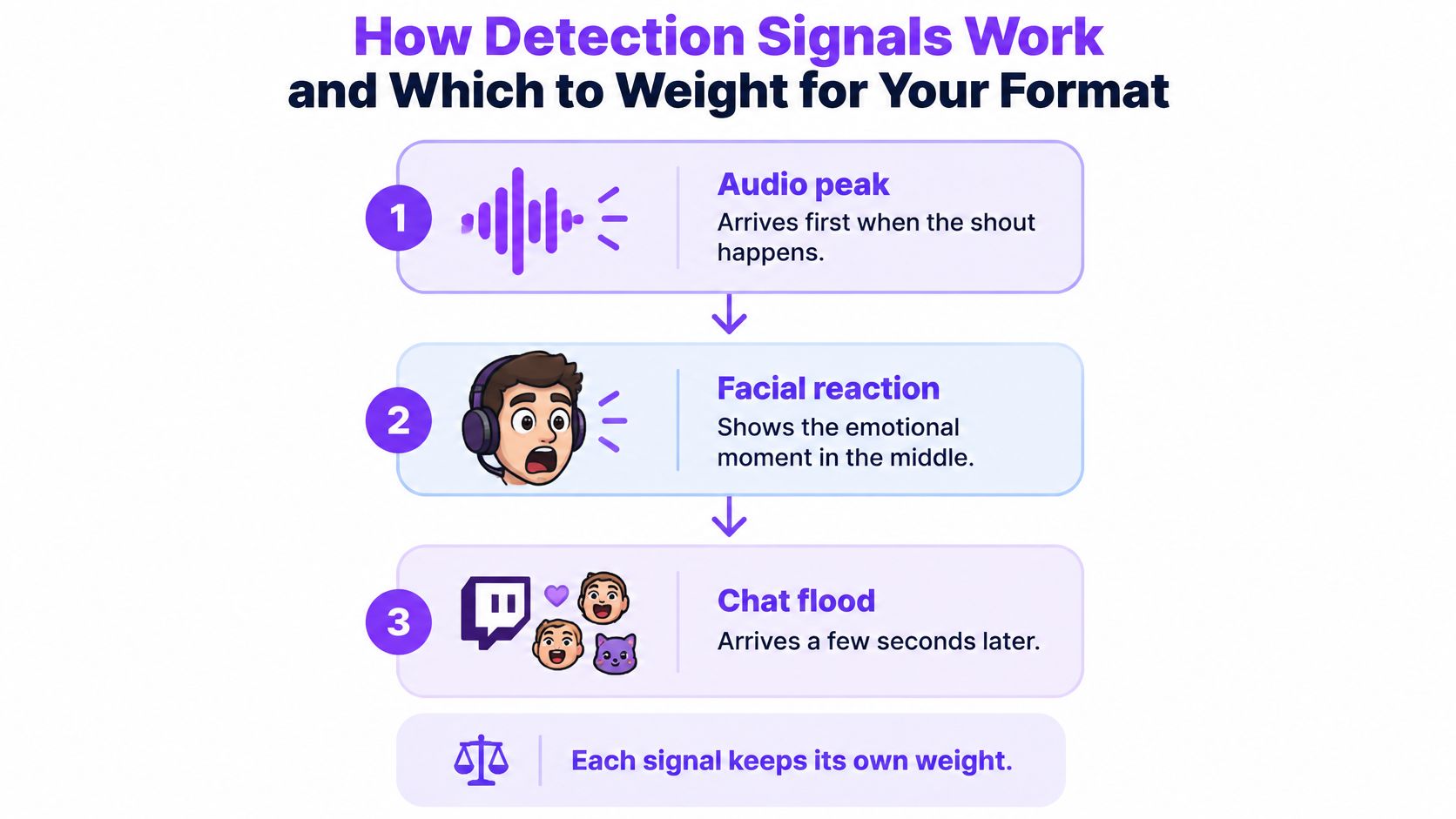
A streamer misses a jump and shouts. The audio peak arrives first, their facial reaction follows, and chat floods with emotes a few seconds later. Those events belong to the same moment, but they don’t share an exact timestamp.
A good detection system preserves that timing difference. Otherwise, it might cut directly to the shout, omit the failed jump and finish before the audience reaction. Finding the peak and finding the complete clip are different jobs.
Detection signals and what each one catches
| Signal | What It Detects | Works Best For | Main Weakness |
|---|---|---|---|
| Chat velocity | Message spikes, emote floods and copy-pasted chants | Just Chatting and community events | Raids and bots can inflate the spike |
| Audio energy | Loud reactions, screams and sudden sound changes | Gameplay peaks and jump scares | Game music, alerts and ads can look like peaks |
| Speech and transcript | Jokes, stories and spoken reactions | Just Chatting and VTuber streams | Clips need context to stand alone |
| Facecam and visual motion | Facial reactions, gestures and sudden movement | Reaction and IRL streams | Misses off-camera events and screen-only action |
Treat these signals like witnesses. An excited voice is evidence that something happened, but it doesn’t explain what happened. A transcript can supply meaning, while the picture shows whether the excitement came from gameplay, a donation alert or a sneeze.
In a multimodal long-form highlight-detection study, adding transcripts to visual captions improved HIT@1 by 6.25 points, while combining visual captions, transcripts and audio volume produced the strongest overall results across the reported ranking metrics. HIT@1 checks whether the highest-ranked selection finds a relevant highlight. The result supports combining evidence rather than treating loudness as a verdict.
How a long recording becomes a shortlist
A practical pipeline follows this sequence:
- Segment the VOD into coherent windows. Keep an exchange, action sequence or explanation together where possible. Arbitrary cuts can separate a setup from its payoff.
- Extract audio and speech features. Measure changes in sound energy and transcribe what people say, retaining timestamps for both.
- Detect reactions and events. Identify candidate gameplay action, expressive faces, gestures or conversational turns.
- Weight and fuse the scores. Combine the available evidence according to the content type. Missing chat shouldn’t make an otherwise strong moment impossible to select.
- Merge adjacent high-scoring windows. Join related peaks into a complete scene rather than returning overlapping clips of the same event.
The fusion stage is where creator preferences matter. A loud reaction supported by gameplay action deserves different treatment from a loud alert over a loading screen. Temporal smoothing then helps prevent the shout, laugh and chat response from appearing as separate recommendations.
Choose weights for your format
For shooter gameplay, favor meaningful event peaks and supporting audio, not constant gunfire. A quiet clutch can matter more than a noisy routine fight. Check whether the model preserves enough lead-in to explain the stakes.
For Just Chatting, prioritize speech and conversational context. Start at the first complete sentence needed to understand the thought. Removing every pause can ruin comic timing or make a thoughtful answer feel abrupt.
For VTubers, combine speech with avatar expression and movement, but verify that the system recognizes the visual style. Expression tracking won’t necessarily behave like ordinary facecam analysis.
Consider a hypothetical three-hour gameplay session with ten candidates, half of which repeat similar fights. Raising the event-score cutoff may remove weaker examples, but a stricter threshold alone won’t guarantee variety. You may also need to suppress similar events or select across different stream segments.
Practical rule: Set a content-type profile, review an initial sample, adjust the cutoff once and save that configuration as your baseline.
Keep a note of why you rejected candidates. Repeated alerts suggest an audio-weight problem; missing punchlines suggest a context or boundary problem. Those diagnoses are more useful than deciding that the model is good or bad.
From Long Stream to Published Short in One Workflow
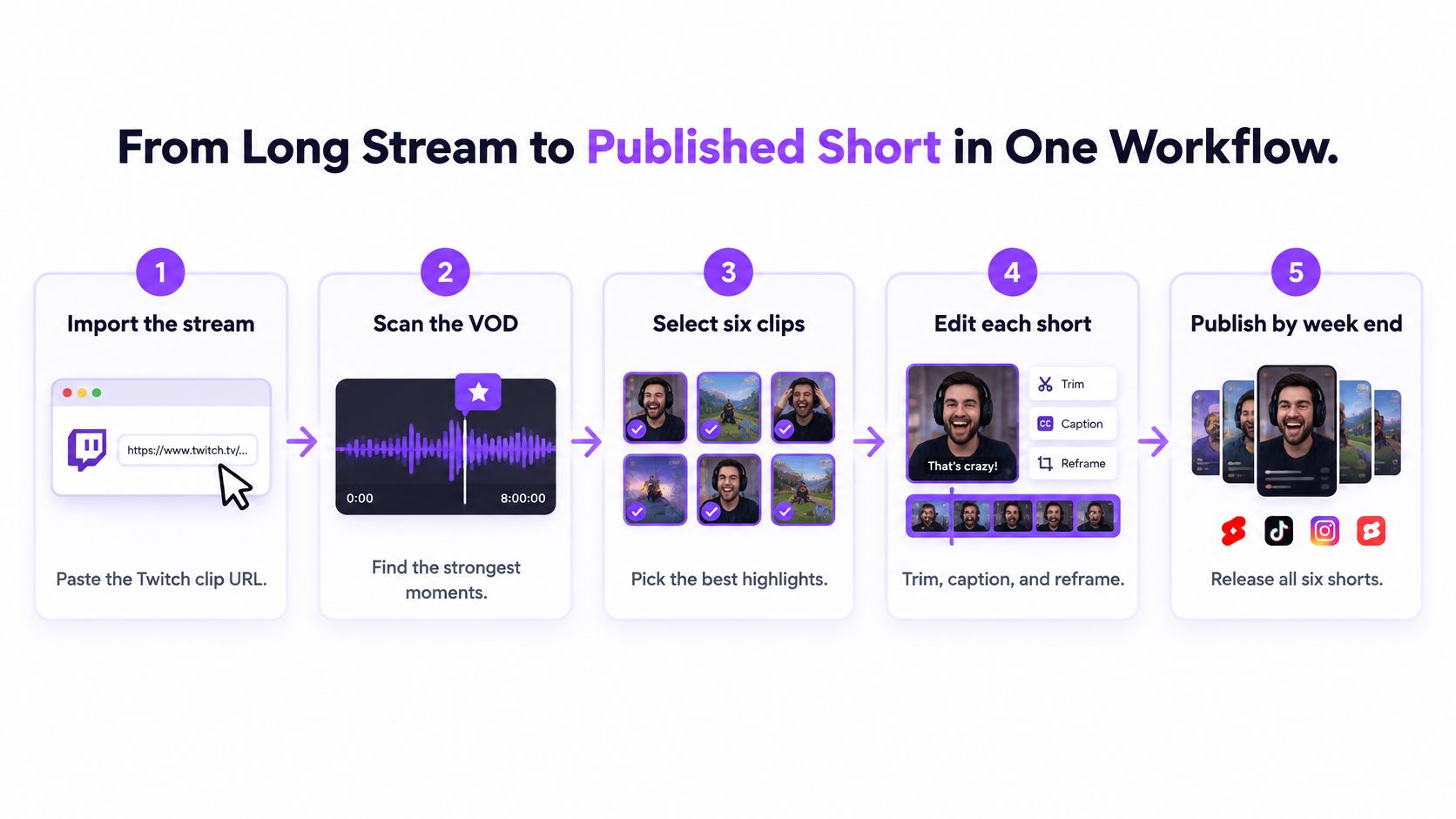
Suppose you have an eight-hour Twitch VOD and want six shorts ready by the end of the week. Your task isn’t to make every detected moment publishable. It’s to move a manageable selection through review, editing and distribution.
For this hypothetical example, you might budget most of a working day for a manual pass and under an hour for reviewing a prepared shortlist. That’s an illustrative planning estimate, not a measured benchmark, and it excludes processing time and detailed editing.
Move through the recording in order
-
Import the correct source. Connect Twitch or upload the recording when you want to scan a full broadcast. Pasting a Twitch clip URL starts with an existing excerpt, so don’t confuse clip conversion with searching the entire VOD.
-
Run the highlight finder across the full VOD. Let it rank potential moments before you begin polishing individual clips. This prevents you from spending your editing time on an early candidate when stronger material appears later.
-
Review the shortlist for meaning and variety. In this example, inspect twenty candidates to choose six. Reject repeated fights, unexplained reactions and clips that only make sense if someone watched the previous conversation.
-
Edit the selected moments for vertical viewing. Keep both facecam and relevant gameplay visible, correct animated captions and add a title hook that accurately describes the payoff. Remove dead air selectively, leaving pauses that create suspense or make a joke work.
-
Schedule the finished versions. Prepare the posts for TikTok, YouTube Shorts and Instagram Reels in your publishing workspace. Preview each version so captions, interface overlays and the crop don’t hide important action.
-
Use a timeline export when necessary. A pre-edited project for DaVinci Resolve or Premiere Pro is useful when you need precise audio repair, layered graphics or more deliberate pacing. Routine clips don’t need that extra handoff.
Keep the workflow connected
StreamGen is one unified option for this process: our AI Clip Finder analyzes every minute of a Twitch VOD, detects high-energy moments and ranks clips by shareability; the Clip Editor prepares vertical shorts, Auto Posting schedules distribution, and the VOD Editor provides a separate pre-edit route into DaVinci Resolve or Premiere Pro. For existing Twitch clips, pasting a clip URL or connecting an account lets the AI convert the excerpt into a vertical video with captions in seconds.
The same sequence works with tools that offer equivalent stages. Use a consistent video repurposing workflow so source selection, edits and publishing decisions don’t get lost between apps.
Wistia’s 2025 State of Video Report, summarized by CMS Critic, analyzed more than 14 million videos and found that videos shorter than one minute achieved a 50% average engagement rate in 2024. That’s context for concise editing, not a promise about your shorts or a reason to cut away necessary explanation.
Ranking Clips for Reach Versus Long-Term Value
The most viral clip isn’t automatically your most valuable clip. A spectacular failure can attract viewers who enjoy the accident but have no interest in your next stream. An explanation of a difficult decision may reach fewer people while giving the right viewers a reason to return.
The 2025 State of Create report found that fans encounter almost twice as much short-form content, yet consider long-form content more valuable and are far more likely to pay for it. For a streamer, that makes short-form selection a question of audience development, not just excitement.
Give each clip a job
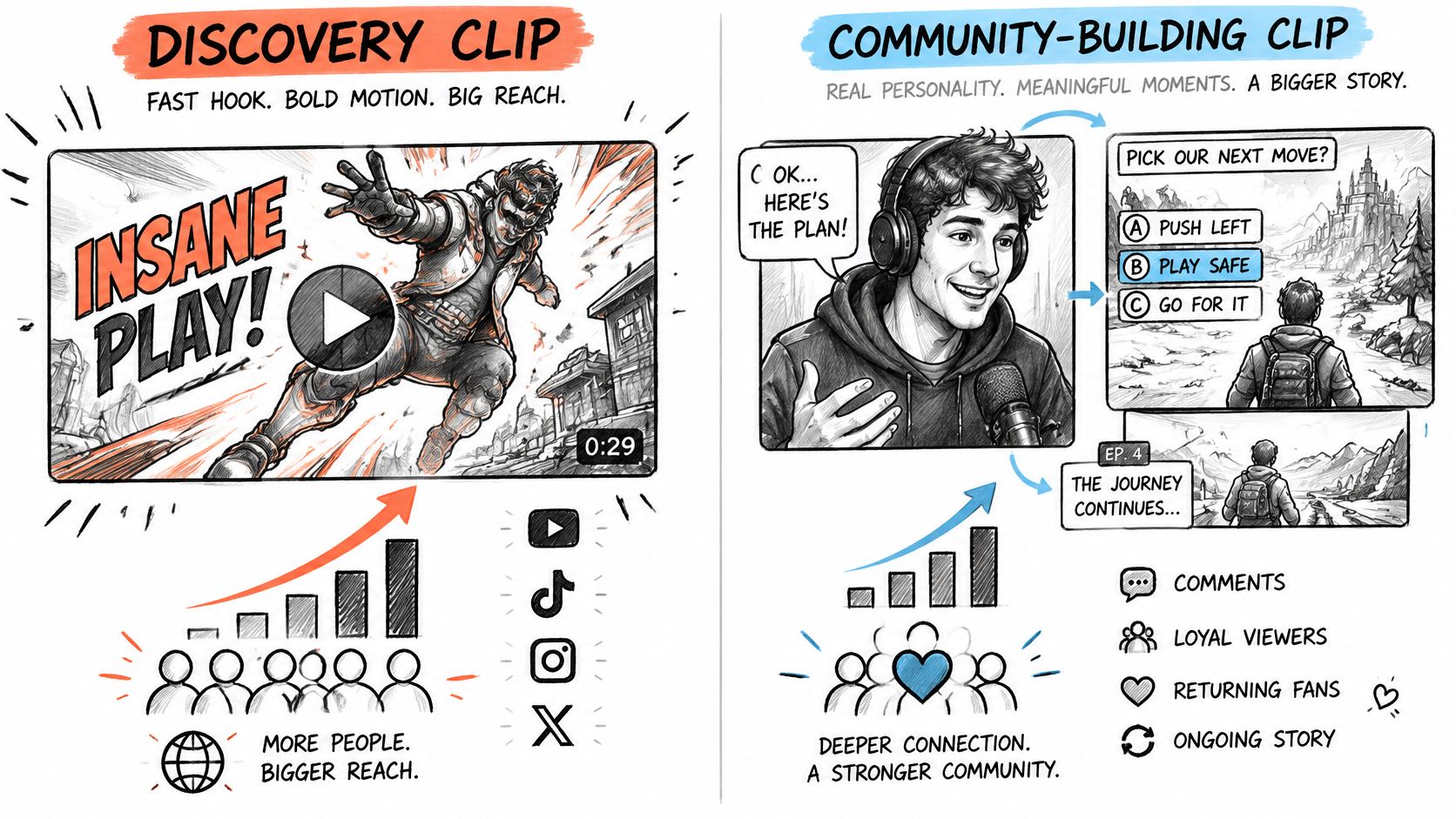
A discovery clip offers a quick reason to stop scrolling: visible stakes, an unusual result or an immediately understandable joke. Use clear video game hooks without promising something the footage doesn’t deliver.
A community-building clip reveals how you think or what makes your channel recognizable. It might explain a gameplay decision, continue a storyline or show your relationship with regular viewers. Its value depends on whether viewers want more of that experience.
For a discovery-focused week, publish mostly accessible, high-energy moments while reserving space for a context-rich selection. If your priority is deeper engagement, give more room to explanations and recurring stories.
Watch for the next action
Use a checklist matched to the clip’s purpose:
- Completion and rewatches: Did viewers stay for the payoff, or return to understand it?
- Shares: Did they find a reason to send the moment to someone else?
- Follows per impression: Did exposure translate into interest in the creator?
- Profile visits: Did the clip encourage people to investigate the channel?
- Full-VOD watch time: Did viewers continue into the longer experience?
- Subscriptions and returning viewers: Did those visits develop into a continuing relationship?
Check the selection itself before blaming distribution. Did the boundaries preserve the point, and did the ranked batch contain enough distinct moments worth posting? An attractive edit can’t repair a candidate with no clear purpose.
A discovery clip earns attention. A community-building clip gives viewers a reason to recognize you next time.
If views are high but viewers don’t move toward the full stream, change the selection rule. Try a moment that demonstrates your personality or decision-making instead of producing more versions of the same spectacle.
Measuring Whether AI Picks Match Human Judgement
Interesting is a temporal-selection problem. A tool can identify the correct event but still produce a poor clip by starting after the setup or ending before the consequence. Check both the choice and its boundaries against a reference.
That reference can come from human annotations or engagement signals such as replay activity and completion. Neither is perfect: people disagree, and audience behavior reflects presentation as well as the underlying moment.
Understand what the benchmark measures
A video-summarization study describes TVSum’s frame-level importance scores from 20 human annotators across 50 videos, reports F1 agreement between generated and reference summaries, and found that contrastive training improved a video-LSTM baseline’s TVSum F1 by 4.8% without labels in the contrasting objective. That suggests useful selection cues can be learned without extra annotation, but it doesn’t establish performance on your channel.
For ranked highlight intervals, mean average precision checks how successfully relevant moments appear in the results. Temporal intersection over union compares the overlap between proposed and reference time intervals.
Build a small channel-specific test
- Mark human selections. Choose a sample broadcast and identify the moments you’d publish, including their start and end points.
- Compare boundaries. Look for missing setups, clipped sentences and endings that drag beyond the payoff.
- Inspect the ranked batch. Count publishable selections, duplicates and important moments the tool missed.
For an adjacent editing perspective, Pixel Samy Studios on podcast editing offers context for comparing automated clipping with human editorial choices.
Use your test to diagnose errors, not just assign a score. If an initial top-ten sample misses your marks, change the cutoff or signal weighting before publishing a batch.
Publishing Clips Within Platform Disclosure Rules
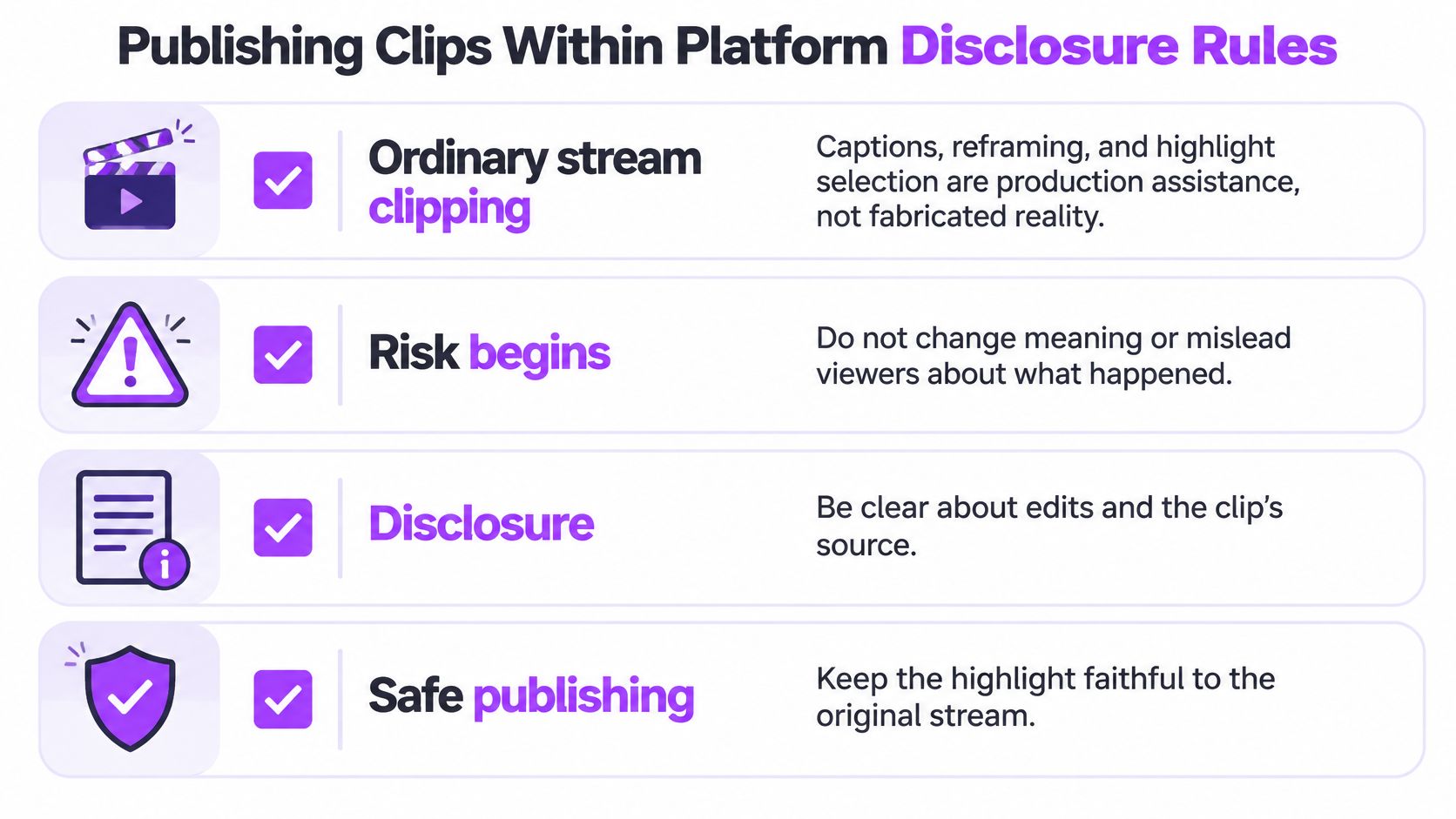
Ordinary stream clipping, including captions, reframing and highlight selection, is production assistance, not fabricated reality. The important question is whether your edits faithfully present what happened or create a realistic event, statement or performance that didn’t occur.
Disclosure and monetization are separate concerns. Influencer Marketing Hub’s guide to AI disclosure rules explains that YouTube distinguishes permitted AI assistance from repetitive or mass-produced content lacking meaningful originality, while realistic synthetic or altered content may require disclosure; it also describes TikTok’s disclosure requirements for realistic AI-generated or manipulated media and automatic labeling through provenance signals such as C2PA metadata.
Check meaning before the publishing queue
A caption correction doesn’t create the same risk as replacing someone’s words with synthetic speech. A vertical crop can be routine formatting, but it can also hide context that changes how viewers interpret an interaction. Judge the result, not merely the name of the editing feature.
Automation makes this review more important. If a caption template misidentifies a speaker or an opening repeatedly misrepresents events, a hands-off queue can reproduce the mistake across many posts.
Keep a publishing checklist
- Preserve the original VOD. Keep a source copy that lets you verify the event and recover surrounding context.
- Retain edit decisions. Record the selected interval, material alterations and the human reason for choosing it.
- Avoid near-identical output. Adapt crops, openings and captions for each platform, but don’t treat cosmetic changes as proof of meaningful originality.
- Add commentary when it contributes. Explain missing context or your reasoning when that helps viewers understand the moment. Don’t add filler merely to appear creative.
- Review before bulk publishing. Check caption accuracy, speaker identity, implied meaning and any altered voice or image.
- Check current platform guidance. Before launching a new synthetic-media format, read each platform’s current disclosure instructions and complete the relevant publishing controls.
Build those checks into your stream-to-TikTok process rather than treating them as cleanup after posting. Word censorship, for example, can help with presentation, but it doesn’t establish originality or settle disclosure requirements.
A disclosure label isn’t permission to mislead, and using AI doesn’t automatically make faithful clipping unacceptable. Platform rules differ and change, so keep the checklist as an operating habit rather than a setting you configure once.
Run Your First AI Highlight Batch This Week
Choose a recent VOD from a stream that went well, not the longest recording available. For a manageable first experiment, try this plan:
- Review a small shortlist. Inspect ten candidates using the profile appropriate to your format. Write down the main reason you accept or reject each.
- Finish the strongest selections. Choose three for this trial, then check the vertical framing, captions, title hook and opening sentence.
- Give the batch a purpose. Include a community-building moment that leads naturally toward the full VOD, rather than filling every slot with spectacle.
- Publish deliberate versions. Adapt the presentation to the platforms you use and keep a record of which source moment produced each post.
- Evaluate before expanding. Over a two-week trial, inspect completion, follows and full-VOD watch time, then adjust the selection rule.
Keep the first experiment small enough that you can explain every editorial choice. If you can’t say why a candidate belongs in the batch, leave it out until you have a clearer purpose for it.
Your first batch tests a selection rule; it isn’t a finished strategy. Judge the second batch by whether it improves the audience actions you care about, not whether it beats the first batch’s largest view count.
StreamGen brings AI highlight finding, vertical clip editing and scheduling to TikTok, YouTube Shorts and Instagram Reels into one workspace. Visit StreamGen to turn a recent Twitch recording into a reviewable first batch, then use your results to decide which moments deserve the next publishing slot.
More blog posts