Six social platforms had more than a billion monthly active users by early 2025, according to DataReportal’s overview of the top social platforms. For a Twitch creator, that changes the distribution question. You don’t need a completely new idea for every network, but you do need a version that makes sense to the viewer encountering it there.
Effective cross posting on social media separates what happened from how you present it. Reuse the clutch play, surprising reaction or useful explanation. Adapt the opening, framing and context, then judge each version by what viewers do on that network.
Table of Contents
- Cross-Posting Means Reusing the Core, Repackaging the Wrapper
- What Changes Per Platform in Format, Hook and Caption
- Technical Limits That Stop Cross-Posts From Publishing
- Measuring Each Platform on Its Own Terms
- Posting Cadence Without Audience Fatigue
- Build the Workflow and Run Your First Week
- Automating the Multi-Network Queue With Unified Tools
Cross-Posting Means Reusing the Core, Repackaging the Wrapper
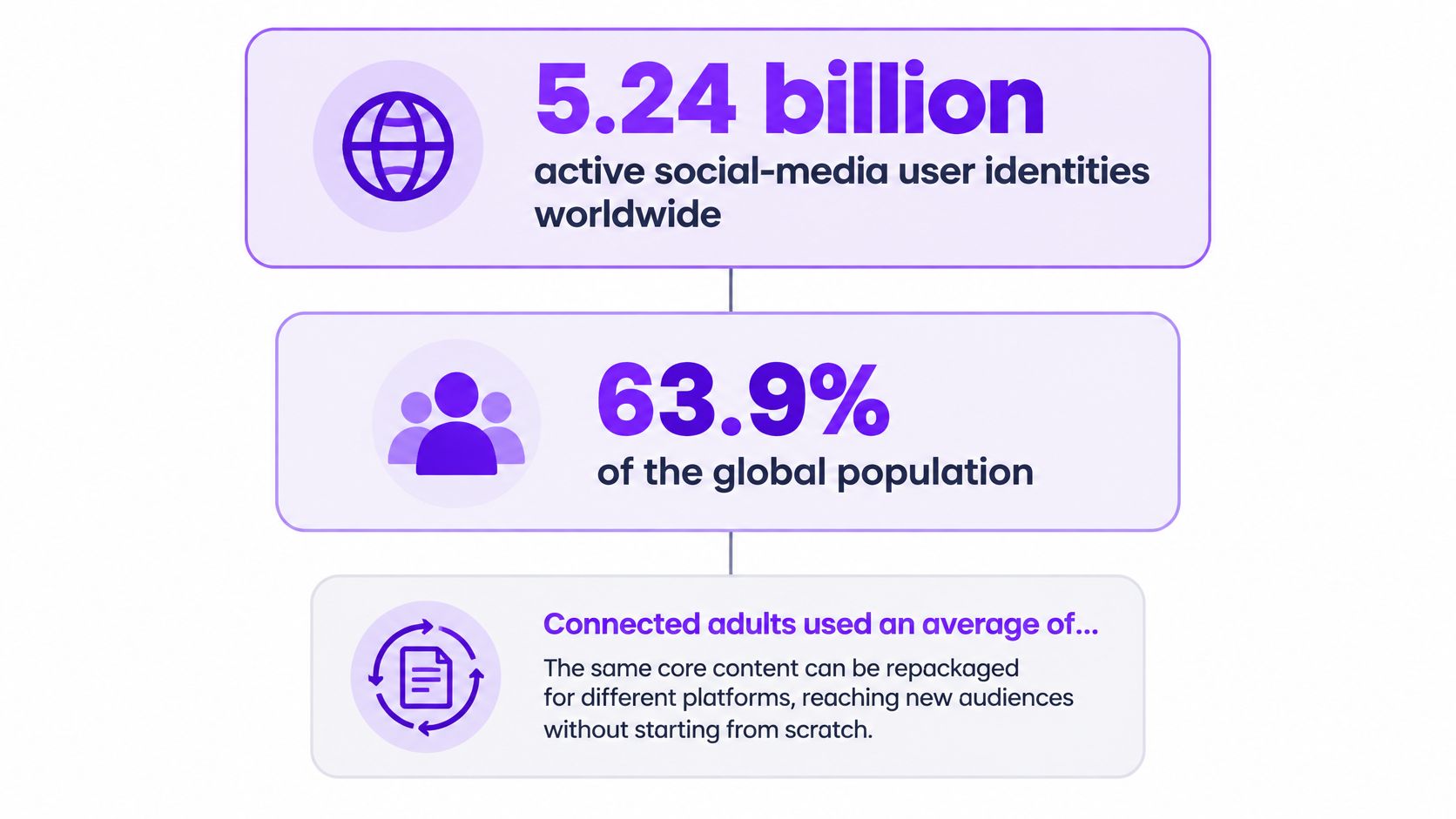
DataReportal’s global social-media overview counted 5.24 billion active social-media user identities worldwide in January 2025, equivalent to 63.9% of the global population. These identities aren’t necessarily unique people, but they show why treating a single network as your entire audience is a poor distribution strategy.
Cross-posting means publishing the same source moment across multiple networks. It doesn’t have to mean uploading an identical file everywhere. Think of a film shoot that produces different trailers: the story stays intact, while the opening, length and promise change for the audience.
Separate the moment from its presentation
- Story core: The event, its payoff and the point a viewer should take away.
- Platform wrapper: The crop, opening hook, captions, title, description and release timing.
Say your Twitch highlight contains a clutch comeback. The core is the unexpected win. TikTok gets an immediate curiosity-led opening, YouTube Shorts gets recognizable game context, and Instagram Reels gets a clean visual presentation that makes the moment easy to send to a friend.
The production saving comes from preserving the underlying edit, not refusing every platform-specific change. An AI content repurposing workflow can help organize that source-to-derivative process. For the distribution side, SuperX’s guide can help you build a cross-platform content workflow around a shared content queue.
Before publishing, write down what stays fixed and what can change. Otherwise, a simple adaptation can become an unnecessary re-edit, or a rushed copy can reach viewers without enough context.
What Changes Per Platform in Format, Hook and Caption
Per-platform adaptation checklist for short vertical clips
| Element | TikTok | YouTube Shorts | Instagram Reels |
|---|---|---|---|
| Frame | 9:16 vertical | 9:16 vertical | 9:16 vertical |
| Opening hook | Fast curiosity hook in the first seconds | Clear context and a visible payoff | Strong visual moment that invites a save or share |
| Caption | Trend-aware, short, burned in inside safe areas | Descriptive, supports search | Polished, visually aligned, burned in inside safe areas |
| Title or metadata | Short, hook-led text | Searchable title that matches what a viewer would type | Concise caption with a clear point |
| Audience intent | Discovery through trends | Search and returning viewers | Brand and product research, saves and shares |
Treat this checklist as a starting creative hypothesis, not a guarantee about recommendation systems. A clear explanation can work on TikTok, and an unexpected visual can work on Shorts. The useful distinction is which viewing need you address first.
For the same comeback clip, a TikTok opening might put the losing position immediately on screen, with a caption that raises the question of whether the player can recover. Don’t add a trend reference unless it fits the moment. Unrelated slang doesn’t make an edit native.
For YouTube Shorts, replace an opaque stream title with the game name and a recognizable situation. A title such as Valorant comeback after losing the spike gives a stranger more context than Chat couldn’t believe this. Keep the resolution visible rather than spending the entire clip promising it.
On Instagram Reels, remove distracting overlays and select a cover that communicates the situation. Frame the caption around a relatable reaction or a useful takeaway. Asking viewers to share only makes sense when there’s an obvious reason someone else would enjoy it.
Make the frame readable before decorating it
Vertical reframing should preserve the action and the reaction. In gaming footage, a centered crop can cut off the minimap, scoreboard or enemy position that explains the play. Use a split layout when keeping gameplay and facecam together would otherwise make either unreadable.
The practical guide to changing a video’s aspect ratio is useful when a simple crop removes information the viewer needs. Preview the result at phone size, not just inside a large editing monitor.
Burn in dialogue captions, but check them against each destination’s interface. Buttons, account details and description overlays can obscure words near the edges. Keep one clean canonical master and export derivatives from it rather than recutting a downloaded social post.
Before export, run this check:
- Context: Can someone understand the hook without watching the stream?
- Discovery: Does the title describe something a viewer might look for?
- Readability: Are captions clear of interface overlays and important gameplay?
- Payoff: Does the edit reach the promised moment without avoidable setup?
Rewrite the first caption line for each destination. That small editorial task is usually more useful than changing colors while leaving the same confusing introduction intact.
Technical Limits That Stop Cross-Posts From Publishing
A clip appears in the scheduler, but never reaches the public feed. Before changing the creative, check authorization, visibility and upload status. A completed export isn’t a completed publication.
TikTok’s content-sharing guidelines require user authorization and the video.publish scope for Direct Post; they restrict unaudited clients to private visibility and describe creator-specific daily caps, typically around 15 posts per creator account, plus six requests per minute per user access token. The same guidelines support MP4, WebM and MOV, recommend H.264, accept 23–60 FPS and files up to 4 GB, and allow uploads up to 10 minutes through the developer endpoint, subject to the creator account’s publishing-duration limit.
Platform constraints and how to work around them
| Constraint | What it means | Workaround |
|---|---|---|
| Authorization scope | Direct Post needs video.publish and user authorization | Confirm authorization before building the queue |
| Visibility | Unaudited clients are restricted to private visibility | Test privately; use an audited integration for public release |
| Daily cap | Creator-specific caps apply to audited integrations | Cap each account’s daily queue and spread releases across days |
| Request rate | Each user access token has a request allowance | Throttle requests and queue them per account |
| File specification | Container, codec, frame rate, size and duration must pass validation | Export within the documented specifications and account duration limit |
| Retry behavior | Repeated attempts can flood the API | Use exponential backoff and duplicate-safe publish tracking |
Separate preparation from delivery
Keep media preparation and platform submission as separate jobs. If authorization expires after a file is rendered, reconnect the account and retry delivery. Don’t force the editor to regenerate an unchanged video.
Maintain per-account queues so a blocked destination doesn’t halt every other release. On temporary errors, use exponential backoff, increasing the pause between attempts instead of immediately resubmitting the request.
Publishing rule: An upload acknowledgment proves that the platform received a file. It doesn’t prove that viewers can watch the post.
Track explicit states: queued, uploaded, processing, published and failed. Save the platform’s returned identifier and check its status before retrying an ambiguous timeout. Duplicate-safe delivery means the same publishing job won’t accidentally create repeated posts.
A manual producer can use the same logic in a tracking sheet. Record the destination, file version, scheduled time, current status, returned post link and failure reason. Wait for a definitive result before uploading again, and verify public visibility from the destination itself.
Measuring Each Platform on Its Own Terms
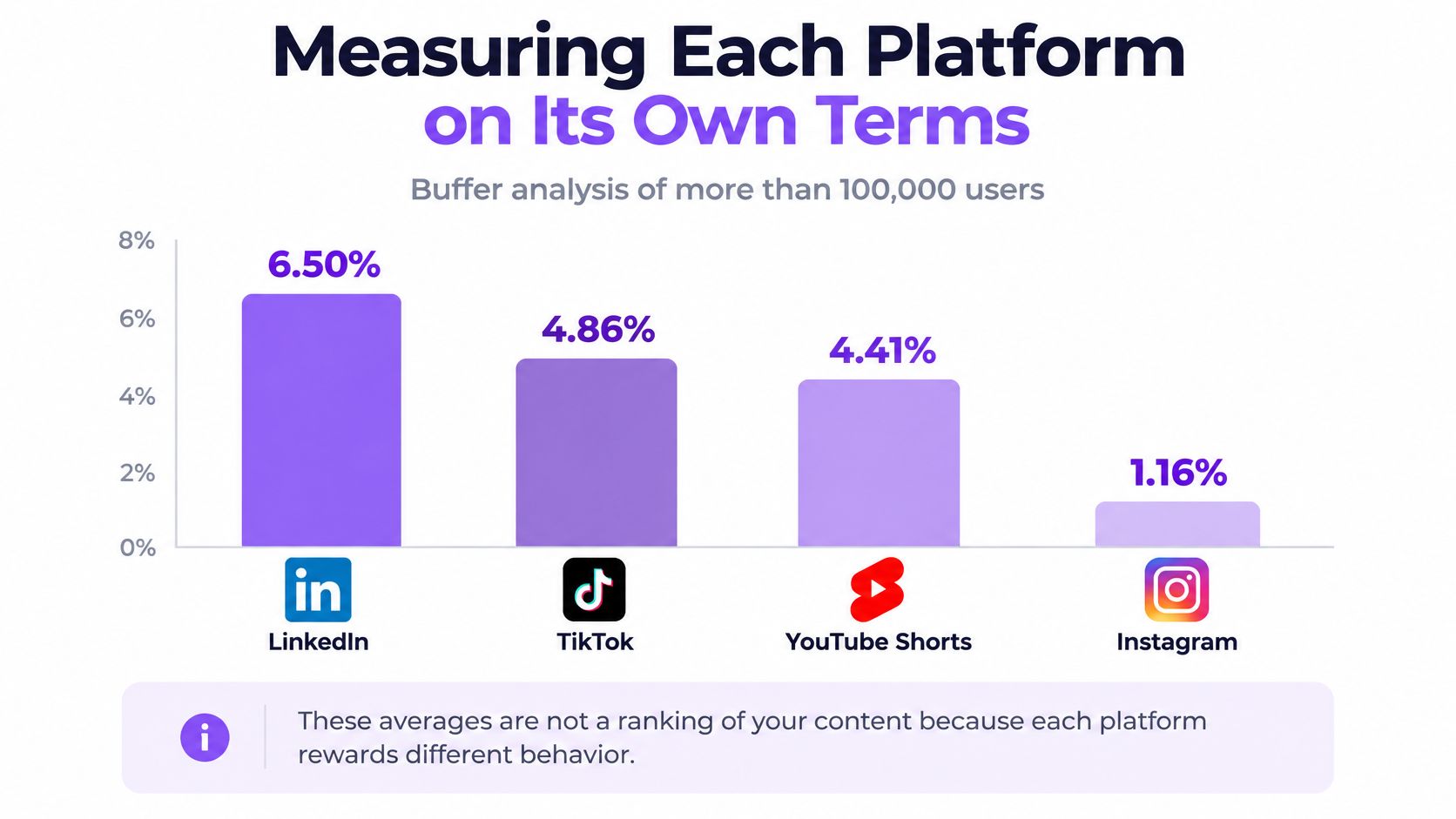
Buffer’s analysis of more than 100,000 users reports average engagement rates of 6.50% for LinkedIn, 4.86% for TikTok, 4.41% for YouTube Shorts and 1.16% for Instagram. Those averages aren’t a ranking of your clips. A save, a private message and a like represent different viewer decisions, and Buffer notes the growing importance of less-visible interactions such as shares, saves and DMs.
Average engagement rate by network
| Network | Average engagement rate | How to read it |
|---|---|---|
| 6.50% | Highest among these listed averages, not proof your gaming clip belongs there | |
| TikTok | 4.86% | Context for the network, not a target for every hook |
| YouTube Shorts | 4.41% | A reference point, not a substitute for retention analysis |
| 1.16% | Lowest among these listed averages; inspect saves and shares separately |
The differences are easier to see visually, but shouldn’t become a league table for your publishing strategy.
Match the metric to the editing decision
Track opening retention, completion rate, average watch time, shares per impression and follower conversion separately for each destination. Use a three-second view rate where the platform exposes an appropriate measure. Don’t rename unlike platform metrics to make a dashboard appear comparable.
- Weak opening retention: Test whether the first frame or opening line establishes the situation.
- Strong opening, weak completion: Inspect delayed payoff, redundant explanation or misleading promises.
- Good viewing, few shares: Ask whether the clip gives viewers a reason to send it.
- Views without followers: Check whether viewers can understand what future content they’ll get.
Define the denominator for every rate and keep it stable. Shares divided by impressions isn’t interchangeable with shares divided by reach.
For a controlled creative test, change only the first caption line while leaving the source moment, edit and presentation unchanged. Review both variants after the same elapsed period and compare the metric chosen before publishing. Organic distribution introduces noise, so treat a small difference as a hypothesis to repeat, not a causal verdict.
Keep the version that improves the intended outcome on that network. A blended engagement rate can hide a useful result.
For an esports team, save these decisions against the variant, not just the source clip. That lets the next editor reuse a successful packaging choice without assuming it will work everywhere.
Posting Cadence Without Audience Fatigue
Consistency and volume aren’t the same thing. Buffer’s finding, summarized alongside the fatigue discussion in GWI’s social-media trends notes, was that users posting at least weekly for 20 or more of 26 weeks received 450% more engagement per post than users posting fewer than five times during that period. That’s an association between publishing patterns and engagement, not proof that increasing your own output will produce the same lift.
For context rather than a target, MarketingTech’s coverage of Metricool’s short-form video report says YouTube Shorts publishers averaged 16.21 short-form videos per month in 2025, the highest publishing frequency among the platforms measured. Copying that average without enough worthwhile clips would confuse activity with quality.
Coordinated sequencing is a better starting point than publishing every derivative simultaneously. Give each release a reason to exist, and leave room to change or cancel a pending version.
Sequence around relevance and overlap
For example, a hypothetical schedule could put a highlight on TikTok on Monday, Shorts on Wednesday and Reels on Friday. The Shorts release could emphasize the tactical explanation, while Reels could emphasize the teammate’s reaction. That spacing is a test schedule, not an established optimum.
A time-sensitive tournament result may justify faster distribution. An evergreen explanation can wait. Don’t delay a clip until its context becomes stale merely to satisfy an arbitrary spacing rule.
Build these controls into the queue:
- Duplicate detection: Flag matching source clips and near-identical derivatives before scheduling.
- Minimum spacing: Require an intentional gap between releases, with an override for timely material.
- Overlap review: Use available audience information and repeated viewer feedback rather than guessing that every follower uses every account.
- Cancellation authority: Let the producer remove an unhelpful variant instead of publishing it because it’s already prepared.
Cadence check: Keep the commitment to useful publishing. Don’t turn that commitment into an obligation to distribute every clip.
Retire a weak version when its packaging offers no distinct value. If comments repeatedly indicate that viewers have already seen the moment, change the selection mix, not just the release time. A queue should help manage audience attention, not merely keep every calendar slot occupied.
Build the Workflow and Run Your First Week
Choose a clip with a clear situation and a visible payoff. A standalone reaction or explainable play is easier to evaluate than an inside joke that depends on the whole broadcast. Start small enough that you can inspect every destination yourself.
The workflow is straightforward, but publication should include editorial review. Multi-platform diffusion research in PNAS Nexus indicates that greater activity across platforms can increase diffusion of both true and false information. For a streamer, that means checking whether an isolated joke, accusation or gameplay claim changes meaning when removed from its original context.
Use this flow as the production overview.
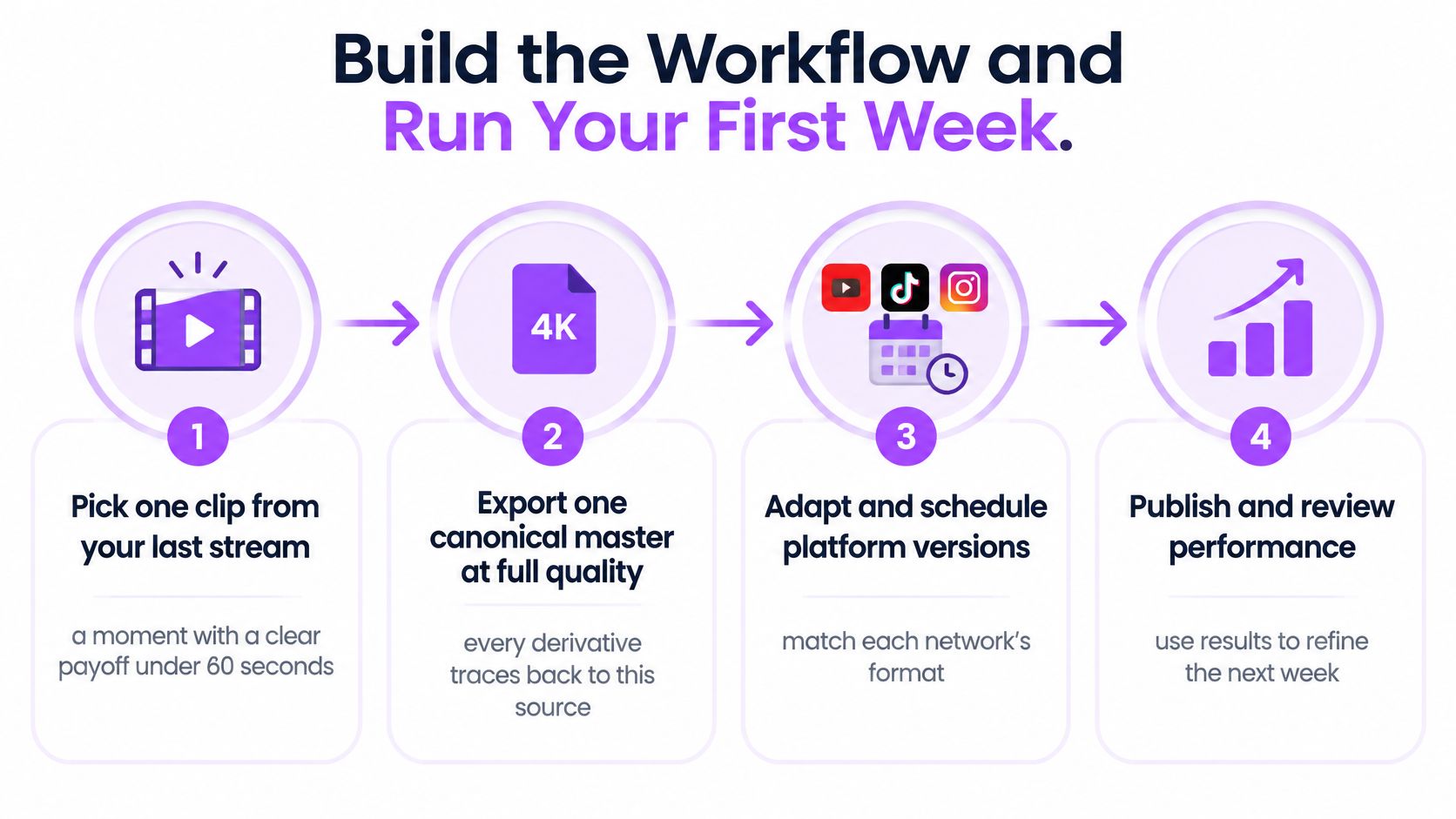
Run a traceable production routine
-
Export the canonical master. Keep a full-quality source without destination-specific overlays. Save the VOD reference and source timecode so an editor can check context or rebuild the clip without starting from a compressed social download.
-
Write the story core in a sentence. Name the situation, payoff and reason to care. If that sentence needs a lengthy explanation, choose a clearer moment or include the missing context in the edit.
-
Create the destination versions. Apply vertical framing, readable captions and the selected opening for each account. Check the actual action frame by frame: a facecam layout shouldn’t conceal the move that makes the highlight worth watching.
-
Prepare metadata as an editorial task, not a final paste operation. Write each caption’s opening line, title where applicable and intended action. Verify player names, game terminology and account mentions. Automated captions can mishear names even when the rest of the dialogue looks correct.
-
Review and schedule. Run word-safety checks, listen to the audio and inspect the context around potentially misleading cuts. Assign each derivative to its account queue with an owner who can resolve publication failures. Preserve the source reference, export version and approval status together.
-
Set the review appointment before release. Record the primary metric, the review window and the eventual decision: keep, adjust or retire. Include a short reason, such as opening understandable, explanation too long, rather than an unsupported label like algorithm disliked it.
The record doesn’t need to be elaborate. A shared sheet can hold the source identifier, destination, variant description, scheduled release, live post link, review date and next action. What matters is that the editor and channel manager can tell which creative published.
Make the first checkpoint concrete
For a hypothetical first week beginning Monday, June 8, 2026, put the checkpoint on Sunday, June 14, 2026. These are sample working dates, not a recommended posting-time claim. Confirm that each intended release is publicly accessible, has its own metadata and has a scheduled metrics review.
If a variant is still processing or failed, assign the fix rather than recording it as poor content performance. If everything published correctly, choose a single editing change to carry into the next production cycle. Expanding the queue should follow a working feedback loop, not precede it.
Automating the Multi-Network Queue With Unified Tools
A unified publishing tool should reduce handoffs between finding a moment, preparing the file and distributing it. The useful comparison isn’t manual versus automated. It’s a visible, editable workflow versus a black box that reports success without showing what happened.
The dashboard model below illustrates how destination-specific versions can sit within a shared schedule.
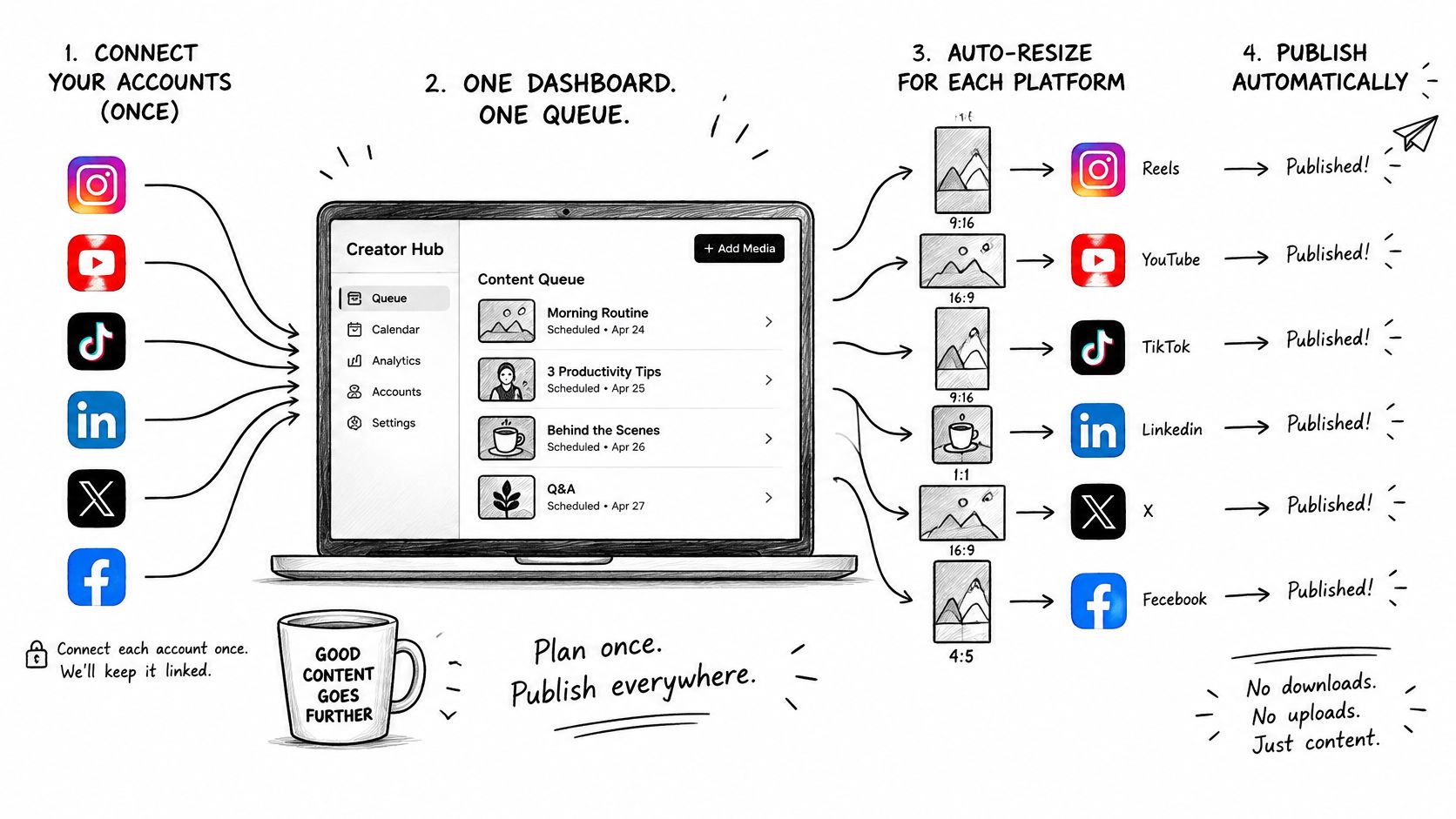
At StreamGen, our Auto Posting schedules clips to TikTok, YouTube Shorts and Instagram Reels, while Autopilot automates the full content workflow. After channels are connected once, a full content queue can be scheduled and published. The guide to automatically posting to social media explains the publishing workflow.
Compare tools by the work they leave you
A basic scheduler can be enough when an editor already delivers finished platform versions. A broader workflow tool is more relevant when selecting highlights and preparing clips are also bottlenecks. Neither choice removes the need for someone to approve the meaning of the final cut.
Use an operational checklist during evaluation:
- Editable variants: Can you change framing, captions and metadata per destination without duplicating the entire project?
- Visible delivery: Does each account show a meaningful publishing state and a live-post reference?
- Actionable failures: Can the operator distinguish expired authorization from an invalid file or a temporary platform error?
- Audience controls: Can the queue flag repeated source material and support intentional release spacing?
- Useful reporting: Can you inspect destination-level results rather than only a combined total?
For small teams deciding which recurring tasks to delegate, Pin Generator’s guide to social media automation for small business owners provides additional planning context. Keep the decision tied to your actual bottleneck rather than the size of a feature list.
This walkthrough provides a visual reference for the workflow.
Test with a real clip before filling the calendar. Inspect its destination versions, confirm public delivery and make sure any failed release remains visible with a reason. Automation can remove repetitive handling, but it can’t give an unclear clip a compelling point. Without editorial adaptation, it just distributes the same problem more efficiently.
StreamGen brings AI highlight detection, clip editing and direct scheduling together so you can turn Twitch moments into platform-ready releases. Visit StreamGen to prepare a highlight, adapt its packaging for your networks and test a publishing queue before scaling your output.
More blog posts