You finish an eight-hour stream, close OBS, and promise yourself you’ll find the good parts tomorrow. Tomorrow becomes the next broadcast. The VOD stays untouched, even though it contains the clutch play, the sudden rant, the chat explosion, and the joke your regulars would have shared everywhere.
That cycle is why an AI content repurposing tool matters to streamers. The useful question isn’t whether software can cut a video. It’s whether it can help you find the right moment, edit it for a vertical feed, and keep it moving toward publication without turning your post-stream routine into another shift.
Short-form video has become a powerful distribution format. A 2026 creator-economy roundup reports that short-form videos generate about 2.5 times more engagement than long-form content, while reported YouTube Shorts RPM sits at $0.03–$0.06, compared with $1–$10 for long-form video, a gap of 100–300 times per view in those estimates. The same roundup estimates roughly 303 million creators globally, a creator economy valued around $250 billion, and a projection of $480 billion by 2027. These figures are reported in the 2026 overview of AI content repurposing trends.
This guide treats repurposing as a connected system rather than an auto-clip button. You’ll learn what the software analyzes, why chat and audio can matter as much as the transcript, which editing features make a clip feel native to TikTok, YouTube Shorts, and Instagram Reels, and how to test a workflow on your own VOD.
Table of Contents
- Introduction Why Long Streams Need Short Clips Now
- What an AI Content Repurposing Tool Actually Does
- How AI Finds the Best Moments in Long VODs
- Core Features That Make Clips Ready for Vertical Feeds
- From Twitch Stream to Shorts and Reels A Practical Workflow
- How to Evaluate and Choose the Right Tool for Your Needs
- Putting Repurposing Into Practice and Next Steps
Introduction Why Long Streams Need Short Clips Now
Long streams are rich in moments but poor in discoverability. A viewer who wasn’t present for the broadcast won’t usually scrub through hours of gameplay hoping to find the scene where everything changed. Short clips solve that discovery problem by carrying one sharp moment to people who may never have encountered your channel.
The trouble starts after the stream ends. You may remember a few moments, but memory is unreliable after hours of live commentary. A quiet setup can lead into a brilliant payoff. A teammate’s reaction may matter more than the play itself. Chat may reveal that a seemingly ordinary exchange was the part everyone cared about.
Manual review makes those decisions expensive. You drag a timeline, wait for the preview, rewind, mark a range, and repeat until the VOD has consumed the evening. Even if you find strong material, you still need to crop it for a phone, place the facecam correctly, add captions, write a title, export the file, and upload it to each platform.
A practical guide to repurposing video content usually starts with the source and the destination. For streamers, the source is often a noisy live broadcast, while the destinations have different viewing habits and formatting expectations. Repurposing means rebuilding the same moment for those destinations, not shrinking the original video.
The useful mental shift: your VOD isn’t the finished product. It’s the source library.
The category is expanding beyond a creator shortcut. One market forecast values the global video editing AI market at $1,497.8 million in 2024 and projects $9,562.0 million by 2030, with a reported 38% CAGR from 2025 to 2030. A separate estimate places AI-powered video editing software at $563 million in 2024 and projects $953.0 million by 2032, with a reported 6.8% CAGR from 2025 to 2032. Those estimates appear in the creator-economy market overview. The point isn’t to chase a market headline. It’s that automated clipping, editing, and packaging are becoming normal parts of video production.
We’ll move through the workflow in order: understand the tool, inspect how it ranks moments, examine vertical editing, follow a Twitch-to-Shorts process, and finish with a buying framework. By the end, you should be able to judge whether a tool removes real work or merely creates another folder of drafts.
What an AI Content Repurposing Tool Actually Does
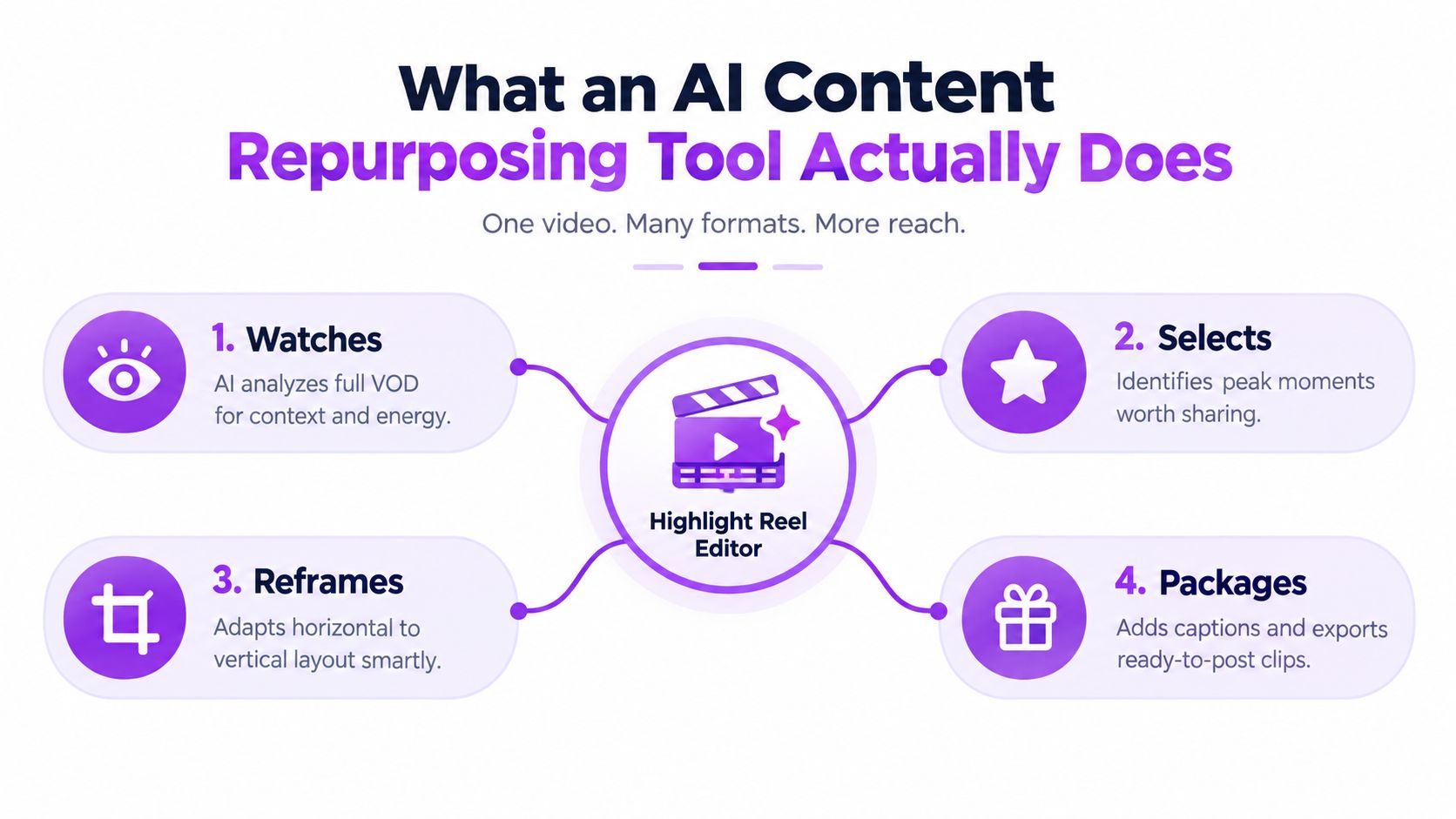
Think of a traditional highlight editor sitting beside you during a broadcast. They watch the entire session, notice the moment when your voice changes, understand what happened before the reaction, cut away the dead air, place the action inside a vertical frame, add readable subtitles, and prepare the result for publication.
An AI content repurposing tool tries to automate parts of that job. It doesn’t just ask, “Which sentences sound interesting?” It works across the source video and turns one long piece of media into outputs designed for another context.
Repurposing is translation, not duplication
A stream and a Short have different jobs. The stream gives viewers room to settle in, follow context, and stay through slower stretches. A Short has to communicate its premise quickly, preserve enough context to make the moment understandable, and keep its visual hierarchy clear on a small screen.
That makes repurposing a translation process:
- Find: identify a moment with a clear emotional, narrative, or gameplay payoff.
- Adapt: reshape the frame, pacing, captions, and opening for vertical viewing.
- Package: add the title, branding, metadata, and export settings needed for a destination.
- Distribute: send the approved clip into a publishing queue or platform workflow.
Manual clipping still gives you the most control, but it asks you to perform every step. Template-based tools reduce repeated formatting work, though they may treat every clip the same. AI-driven tools add analysis and ranking, which helps when the source contains hours of material and the strongest moment isn’t obvious from the transcript.
The three jobs to inspect
When comparing tools, separate selection from editing and distribution. A tool may be excellent at generating captions but weak at finding context. Another may rank clips well but leave you downloading files and uploading them manually.
Ask three questions:
- Can it find moments in the kind of content you make? Gameplay, Just Chatting, esports analysis, and VTubing produce different signals.
- Can it adapt the moment without hiding what matters? A facecam, game HUD, scoreboard, or chat reaction may all need space.
- Can it prepare and move the output where it belongs? Scheduling and direct posting can be as important as the edit itself.
The simplest model to carry forward is find, adapt, distribute. If a product handles only one of those jobs, that’s fine, but you should evaluate it as one component rather than assume you’ve bought a complete repurposing system.
How AI Finds the Best Moments in Long VODs
The hardest part of stream repurposing usually isn’t adding subtitles. It’s deciding which parts deserve attention in the first place.
A transcript can tell a tool that you said “no way,” but it can’t reliably explain whether you were reacting to a major win, joking with chat, or muttering after a routine mistake. Live content depends on surrounding signals. The tool needs to connect what happened on screen with what happened in your voice, expression, and community response.
Why transcript-only scoring misses stream moments
Imagine a gaming VOD where you say, “That was close.” A transcript-only system may flag the phrase because it sounds emotionally relevant. But the video might show a routine escape with no meaningful payoff. Conversely, a quiet clip might show an extraordinary tactical decision while your voice stays calm.
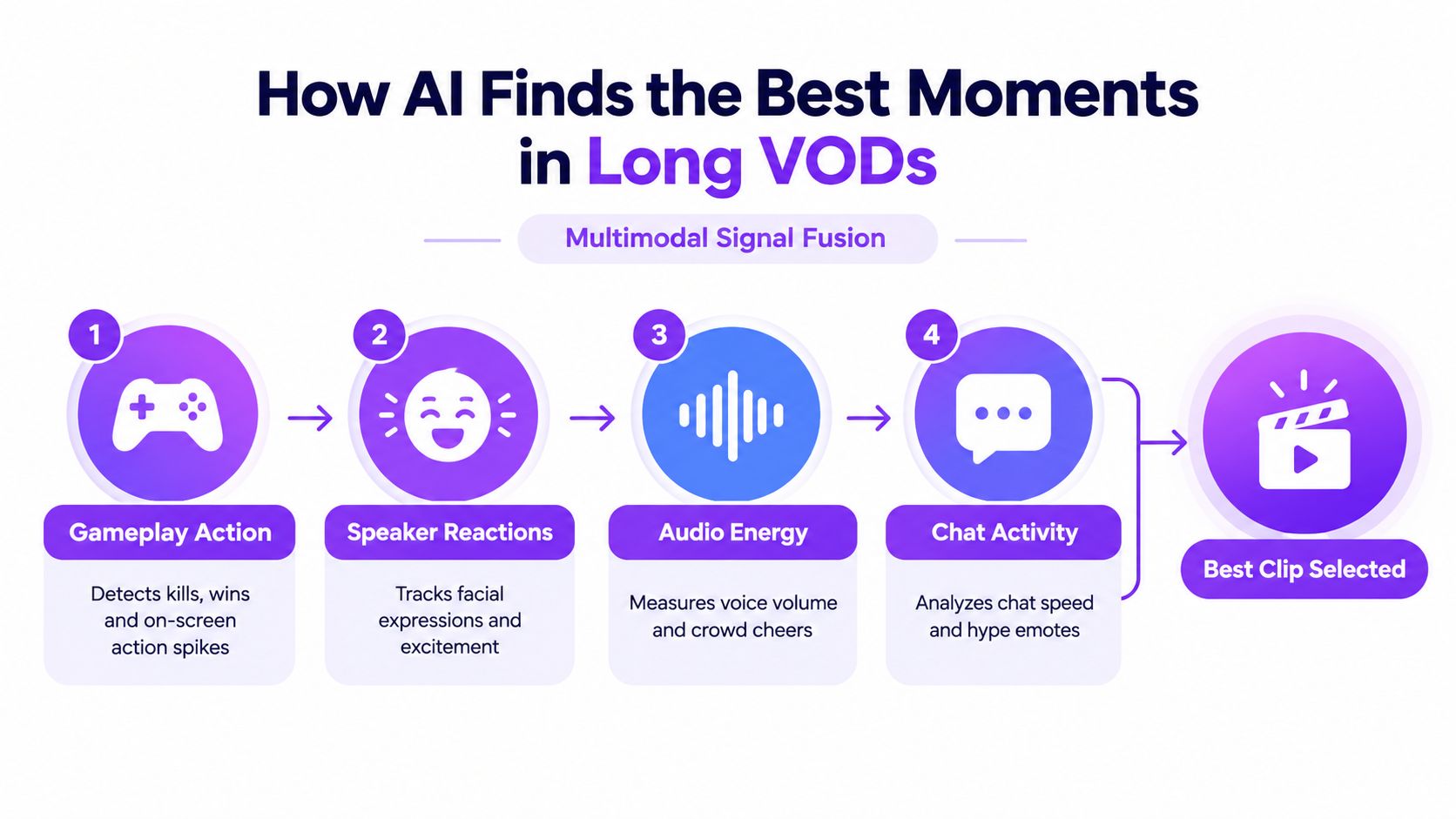
A stronger pipeline combines several forms of evidence:
- Gameplay action can reveal kills, wins, sudden movement, objectives, or other visual changes.
- Speaker reaction can expose surprise, laughter, frustration, or excitement.
- Audio energy can identify a raised voice, a sharp change in delivery, or crowd noise.
- Chat activity can show that viewers reacted strongly at the same moment.
No single signal deserves absolute authority. Loud audio can accompany a weak joke. Fast chat can follow an inside reference that new viewers won’t understand. The value comes from combining clues and then checking the surrounding scene.
A technical explanation of AI video clipping describes the central problem well: the system must rank moments while preserving enough context for the clip to make sense. That distinction separates a memorable segment from a random loud second.
Scene segmentation keeps the story intact
After detecting candidate signals, the system can divide the VOD into scenes or segments. It scores those scenes, identifies promising openings and endings, removes irrelevant material, and then joins adjacent high-value scenes when they belong together.
The HIVE framework describes this as a multimodal highlight-selection pipeline. It separates highlight detection, opening and ending selection, and pruning of irrelevant content, then merges adjacent non-zero-scored scenes into coherent clips. The design aims to preserve narrative flow while cutting redundant material, as described in the HIVE framework paper.
That matters in practice. A clip that begins after the setup may show a dramatic reaction but leave viewers asking what happened. A clip that includes every second of setup may lose momentum. Good segmentation looks for the narrow path between confusion and drag.
The same paper references an earlier highlight-detection study that found a 60% saving in editing time for home-video annotation. That result isn’t a promise about your stream, but it illustrates why automated ranking is valuable. Let the system create a shortlist, then spend your judgment on the shortlist instead of scrubbing the entire archive.
Core Features That Make Clips Ready for Vertical Feeds
Finding a strong moment is only half the job. A horizontal stream capture can contain excellent material and still feel awkward on a phone if the important action disappears outside the crop or the captions arrive too late.
The editor’s task is to preserve the moment’s hierarchy. If the joke depends on your face, the facecam needs visibility. If the payoff happens in the game, the crop needs to keep the action readable. If chat provides the punchline, it needs to appear without covering the gameplay.

Vertical framing should follow the moment
A useful vertical editor does more than force a horizontal frame into a 9:16 canvas. It can use smart layouts to keep the facecam and gameplay visible, reposition the speaker as the focal point, or stack visual areas when both sources carry essential information.
You still need to inspect the result. Automatic framing can follow the wrong face, crop a scoreboard, or leave important UI under captions. The right workflow treats smart reframing as a fast first pass, not permission to skip review. Guidance on changing video aspect ratio is helpful because the technical conversion is easy, while the editorial decision about what stays visible requires attention.
Captions affect comprehension and pacing
Captions help viewers follow speech in sound-off environments, but they also create a second visual rhythm. Independent captioning research reports that videos with captions can achieve up to 40% longer watch time than uncaptioned videos, as reported by video captioning engagement research.
Timing matters as much as transcription accuracy.
Caption timing rule: keep each on-screen caption visible for at least 1 second and no more than 5 seconds, following the caption-design guidance in the same research.
Animated word-by-word captions can emphasize a reaction, but motion shouldn’t make the sentence harder to read. Check names, game terminology, slang, and deliberate pauses. An AI caption is a draft until you’ve watched it with the audio muted.
Small production controls make the clip feel finished
The difference between a raw extract and a publishable Short often comes from small controls:
- Silence removal tightens the opening and removes dead air between setup and payoff.
- Title hooks give viewers an immediate reason to continue, though the title should describe the actual moment rather than promise something unrelated.
- Word censoring can reduce accidental profanity in captions and audio when a platform or sponsor requires cleaner language.
- Brand presets keep fonts, colors, caption positions, and framing consistent across a queue.
Don’t stack every effect on every clip. A tense competitive play may need clean captions and a clear game view. A Just Chatting story may need a tighter face crop and more deliberate text emphasis. Native editing means matching the treatment to the content, not applying the loudest preset available.
From Twitch Stream to Shorts and Reels A Practical Workflow
A workable stream-to-short system starts before you open an editor. Decide what happens to the VOD after the broadcast, where approved clips should go, and which steps still need your eyes.
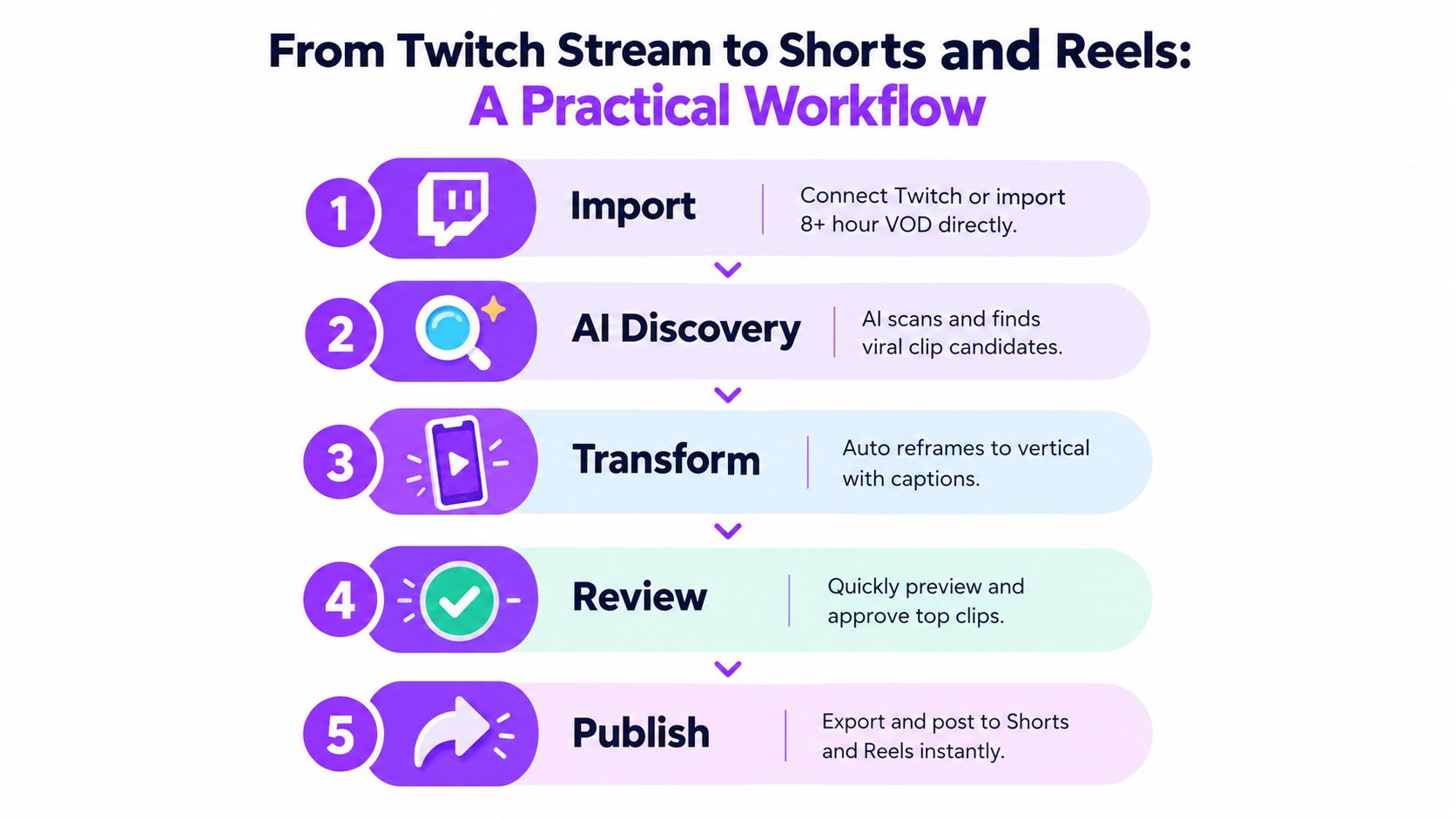
Suppose you’ve finished a long Twitch session. You connect the source or import the recorded file, then let the discovery layer process the VOD. Stream-specific systems can inspect long recordings, including 8+ hour VODs, and rank candidates using gameplay, reactions, chat, and audio signals. You don’t need to remember every timestamp. You need a reviewable list.
The five-stage handoff
-
Import the source. Connect Twitch, bring in an existing video file, or create a manual clip during the broadcast. Direct capture is useful when you already know a moment is worth saving, while VOD analysis is better for surprises you missed live.
-
Review AI candidates. Watch the ranked suggestions with enough context to understand the setup and payoff. Reject loud but empty reactions, repeated moments, and clips that depend on private conversation.
-
Transform for vertical. Choose a layout that protects the important visual information. Correct the crop, review captions, remove unnecessary silence, and adjust the title hook.
-
Approve the queue. Treat approval as an editorial checkpoint. Check the first seconds, the final beat, caption accuracy, audio balance, and anything that could create a rights or brand-safety problem.
-
Publish or export. Send the finished clip into a schedule for TikTok, YouTube Shorts, and Instagram Reels, or export it for a separate post-production workflow.
A unified workspace reduces handoffs between clipping, editing, and scheduling. That matters because each handoff creates another chance to lose the source, forget the caption correction, or postpone publication. Research coverage of the category describes a split between clipping-first, drafting-first, and distribution tools, and argues that teams often get better results by combining specialized steps instead of expecting one product to do everything. You can review that comparison in the 2026 analysis of AI content repurposing tools.
Automation should match your review habit
Some streamers want a browser editor and a small approval queue after every broadcast. Others want an automated system to keep preparing posts while they’re live, then review a batch when convenient. Manual captures and imported files still belong in the workflow because not every valuable moment can be judged from automated signals.
For broader livestream infrastructure and platform options, a SponsorRadar Restream listing can help you evaluate related distribution resources. Keep the roles separate in your mind. Restream-style tools address where live content travels, while a repurposing workflow addresses how a long broadcast becomes short, edited assets.
The strongest setup is the one you can maintain. If automation produces clips you never review, it’s too hands-off. If every clip requires a full timeline edit, it hasn’t removed enough work.
How to Evaluate and Choose the Right Tool for Your Needs
Don’t choose an AI content repurposing tool by counting features. Choose it by tracing your actual path from finished broadcast to published clip.
A solo streamer may value fast discovery and a simple approval queue. A VTuber may need caption accuracy and a layout that handles an avatar cleanly. An esports organization may require exportable projects for professional editors, while an agency may care more about multiple channels, permissions, and repeatable brand presets.
Decision matrix for creator workflows
| Creator Profile | Top Priority | What to Verify Before Buying |
|---|---|---|
| Solo streamer | Low-friction find, edit, and post workflow | Can it analyze your VOD type, create vertical drafts, and schedule without repeated downloads? |
| VTuber | Captions, framing, and visual consistency | Does the crop preserve the avatar and relevant gameplay? Can you correct captions and save brand presets? |
| Esports team | Editorial control and professional finishing | Can it preserve context around competitive moments? Does it export projects for DaVinci Resolve or Premiere Pro? |
| Agency | Multi-channel operations and repeatability | Can you manage several creator workflows, reuse templates, and keep approvals organized? |
Questions that expose workflow gaps
Start with source handling. Can the platform connect to Twitch, import existing files, and process the length of VODs you produce? A tool built around short uploads may become frustrating if your best material lives inside long, noisy broadcasts.
Then inspect signal quality. Does the product use only a transcript, or can it account for gameplay, face reactions, audio changes, and chat activity? Ask whether you can tune what “engaging” means for your channel. A clutch play, a funny conversation, and a community meme won’t share the same scoring pattern.
Language support matters at the editing stage. Check caption coverage for the languages you speak, but also test proper nouns, slang, names, and mixed-language sentences. Broad language support is useful only when the generated captions remain readable and editable.
Finally, examine the handoff. Direct posting is convenient when you want a queue that moves to TikTok, YouTube Shorts, and Instagram Reels. NLE export matters when your team finishes work in DaVinci Resolve or Premiere Pro. Some creators need both, because quick social posts and polished campaign edits serve different purposes.
Pricing should be evaluated alongside fragmentation. A low-cost clipper can become expensive in attention if you need separate tools for captions, resizing, scheduling, and professional export. Compare the complete workflow, not the first subscription price you see.
Putting Repurposing Into Practice and Next Steps
Repurposing works when it becomes a repeatable operating habit. Your VOD enters as raw material, an analysis layer ranks possible moments, an editor adapts the chosen clips for vertical viewing, and a publishing queue carries approved assets to the platforms where your audience may discover you.
Start with one real broadcast rather than a synthetic test. Choose a VOD containing different content types, such as gameplay, conversation, reactions, and quieter setup. Let the tool generate candidates, then review them using a simple checklist:
- Context: Can a new viewer understand what happened?
- Opening: Does the first moment create a clear reason to continue?
- Framing: Are the face, gameplay, and important interface elements visible?
- Captions: Are the words accurate, readable, and timed to the speech?
- Pacing: Can you remove silence without damaging the joke or buildup?
- Publishing: Can the approved clip reach the intended platforms without unnecessary handoffs?
Track quality before chasing volume. Notice which suggestions you keep, which signals mislead the system, and how much review each clip needs. If the browser editor handles your normal posts, use it. If a clip deserves deeper sound design or timeline work, send it to your preferred NLE.
The important result isn’t a pile of generated videos. It’s a queue you can trust enough to maintain. Start with one stream, refine the rules around what counts as a good moment, and add automation only after the review process feels reliable.
StreamGen brings VOD discovery, vertical editing, captions, and scheduled distribution into one workspace for Twitch creators. Use it to turn long broadcasts into reviewable Shorts, TikToks, and Reels, then visit StreamGen to test the workflow on your next stream.
More blog posts
