Manually turning a single hour-long recording into 8 to 12 vertical shorts can take 3 to 5 hours of editor time, according to the 2026 AI video clipping benchmark. That figure changes the question from “Which tool has the most features?” to a more useful one: which clipping software removes the most expensive bottleneck without sacrificing the judgment your content needs?
The answer depends on your pipeline. A traditional editor may still be the right choice for a carefully produced sequence, while an AI clipper is more valuable for a streamer who needs to process long VODs repeatedly. Benchmark results show why there’s no universal winner: single-speaker clip accuracy ranged from 78% to 92%, multi-speaker accuracy from 48% to 76%, and time-to-first-clip for a 60-minute video ranged from under five minutes to 20 to 25 minutes (benchmark data).
| Workflow priority | Best-fit category | Main advantage | Main limitation |
|---|---|---|---|
| Maximum manual precision | Traditional NLE | Detailed timeline and audio control | Highest labor requirement |
| Fast highlight discovery | AI auto-clipper | Rapid first-pass selection | Results may need review |
| Repeatable stream-to-shorts production | Hybrid AI platform | Detection, editing, and publishing in one workflow | Quality depends on content type and settings |
| Long live streams | Stream-focused AI workflow | Searches gameplay, reactions, chat, and audio together | Human review remains important |
| Multi-channel publishing | Integrated clipping platform | Reduces downloading and re-uploading | Platform connections must be configured |
Table of Contents
- The High Cost of Manual Video Clipping
- Defining the Categories of AI Clipping Tools
- Critical Evaluation Criteria for Creators
- Top Clipping Software Compared
- Choosing the Right Tool for Your Workflow
- Implementing Your Clipping Strategy
The High Cost of Manual Video Clipping
Manual clipping appears inexpensive when editing software is already available. The cost emerges in labor: scrubbing footage, locating usable moments, reframing the image, correcting captions, removing pauses, and exporting versions for different feeds.
The workload is measurable. Producing 8 to 12 vertical shorts from one hour-long recording typically requires 3 to 5 hours of editor time when handled manually, according to the 2026 AI clipping benchmark. That estimate excludes titles, publishing queues, and adaptations for TikTok, YouTube Shorts, and Instagram Reels.
Time is the primary production constraint
For a solo streamer, manual editing competes with streaming, community work, sponsorship tasks, and creative planning. For a social team, every new broadcast adds to an existing queue. The constraint is not just that editing feels slow. Manual selection also limits how much source material the team can review.
Live content makes the tradeoff sharper. A long stream may include a quiet setup before a sudden play, a chat reaction that gives a moment its meaning, or a facecam response that matters more than the action itself. Scene detection alone may miss those relationships. Human review can identify them, but locating them by scrubbing through a lengthy recording consumes time that does not scale well with volume.
Practical rule: Treat editing time as a production cost, even when no invoice changes hands.
The market size reflects sustained demand for tools that reduce this workload. Recent industry estimates place the video editing software market at roughly $3.2 billion to $3.75 billion in the mid-2020s, with forecasts commonly placing it near $5 billion by 2031 to 2034. The same market overview cites estimates of $3.25 billion in 2024 with a projection of $4.83 billion by 2032, and $3.54 billion in 2025 with a projection of $4.99 billion by 2031.
Why automation has economic value
AI clipping does not remove editorial judgment. It changes the point at which that judgment is applied. Rather than spending hours searching for possible highlights, a creator can review ranked candidates, reject weak selections, refine promising ones, and reserve more attention for narrative, context, and brand fit.
Selection quality determines whether the time savings hold. A tool that produces a clip quickly but chooses the wrong moment can create additional review work. The useful measure combines discovery time, selection quality, correction effort, and publishing friction, rather than treating output speed as the only result.
For high-volume creators, the economic case strengthens through repetition. Each additional long recording increases the value of automated discovery, particularly when one workflow continues from highlight detection to vertical editing and distribution. The best fit is therefore the tool that reduces recurring labor without forcing creators to surrender control over moments where context determines whether a clip works.
Defining the Categories of AI Clipping Tools
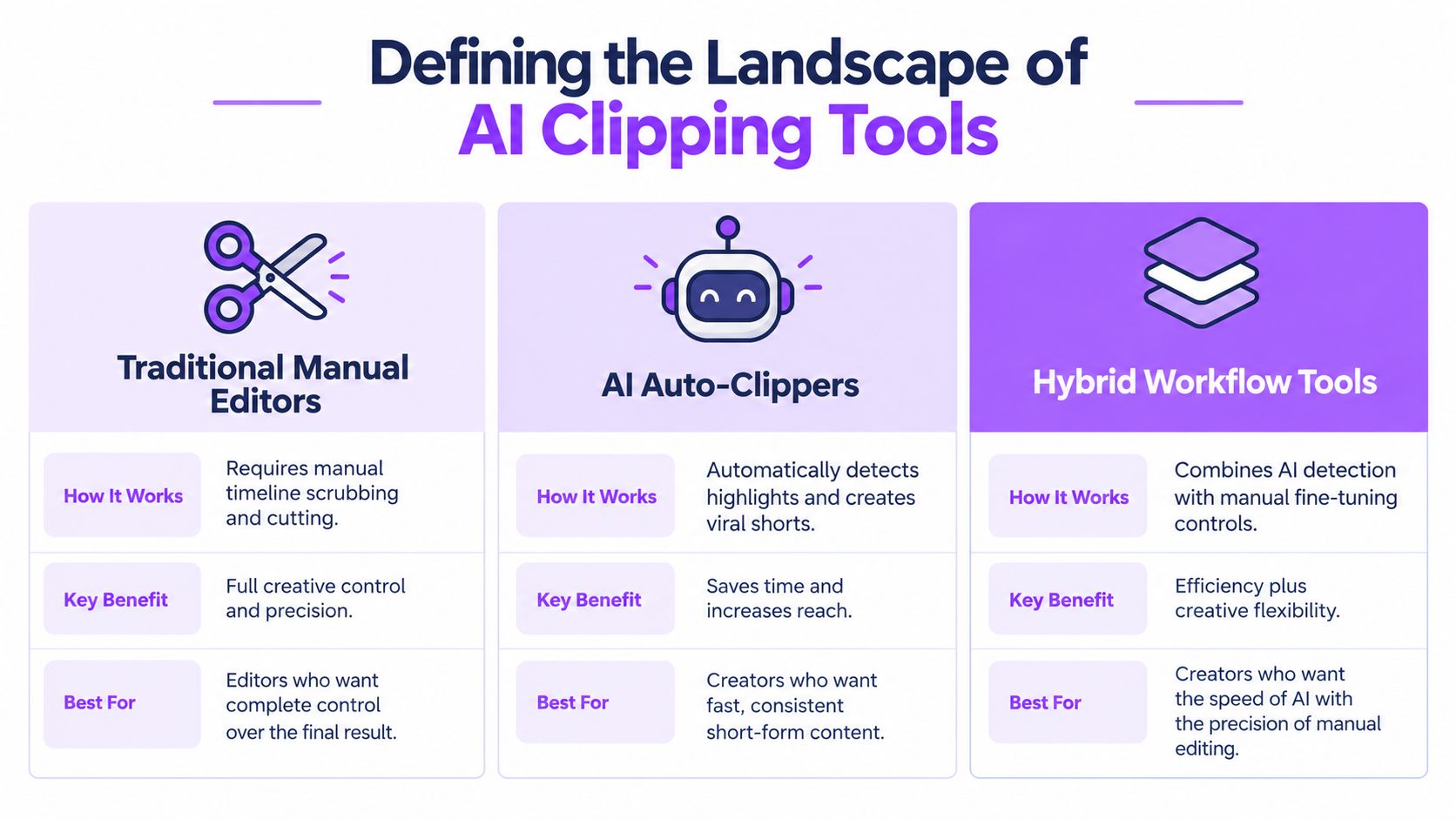
AI clipping software divides into three categories. Manual editors maximize control, auto-clippers reduce discovery time, and hybrid platforms combine automated suggestions with human review. The practical difference is where labor remains in the stream-to-shorts pipeline.
Traditional editors
A non-linear editor such as DaVinci Resolve or Premiere Pro supports detailed post-production. The editor chooses the in and out points, mixes audio, adds overlays, and shapes the final sequence. This makes the category suitable for shorts that must follow a precise creative brief.
The cost is discovery labor. Traditional software does not identify which part of a long livestream combines gameplay, reaction, dialogue, and audience response. An editor must search manually or add a separate detection tool, so control comes with more time spent before editing begins.
Auto-clippers
AI auto-clippers reverse that sequence. The creator provides a long video, the system analyzes it, and the software proposes moments for short-form output. This approach addresses the largest bottleneck for high-volume creators: finding candidates across long recordings.
Selection quality determines whether the time saving is real. Speech-heavy podcasts may offer clear transcript signals, while gaming streams often depend on visual action, chat activity, and reactions that arrive after the event. Fast output can therefore shift work into review if the system ranks weak moments.
Hybrid platforms
Hybrid tools apply AI to discovery and first-pass editing, then leave a person with control over the result. Creators can adjust reframing, captions, pacing, and final cuts before publishing. The category fits workflows that need volume while still requiring editorial checks.
The larger change is from a standalone clip maker to a stream-to-shorts pipeline. A single workflow may cover VOD import, highlight ranking, vertical layouts, captions, title hooks, scheduling, and distribution. Mallary.ai’s API for social publishing shows how publishing automation can sit inside that process rather than remain a separate final task.
For a practical guide to AI video clippers, compare how much of the workflow each category handles. The useful question is not whether a product uses AI. It is whether the tool reduces recurring search and editing labor without removing the review needed for context.
Critical Evaluation Criteria for Creators
The best clipping software should be judged by the failure points in the workflow. A polished interface cannot compensate for weak highlight selection, while accurate detection has limited value if every clip still requires manual downloading, reframing, captioning, and uploading. For high-volume creators, the practical measure is how much review and handling time the tool removes from each stream.
Selection quality comes first
AI clipping systems identify possible highlights through different signals. Audio peaks can indicate excitement, but loudness may also come from shouting, alerts, or background noise. Transcript analysis can find a complete thought, yet miss a visually important play. Chat activity adds live context, although a message spike does not guarantee that the moment will make sense to viewers who were not present.
Content type therefore changes the accuracy problem. The benchmark found single-speaker accuracy between 78% and 92%, while multi-speaker accuracy ranged from 48% to 76%. Those results make broad accuracy claims difficult to apply across formats. A podcast, interview, VTuber broadcast, and competitive gaming stream each require different signals and different standards for a usable clip.
For long streams, evaluate whether the software can account for:
- Gameplay action: Does it recognize meaningful visual events rather than only loud commentary?
- Audience signals: Can chat activity help rank moments without replacing editorial review?
- Reaction timing: Does the system include the buildup and response, or cut into the middle of the event?
- Context: Does the proposed clip stand alone for a viewer who did not see the original broadcast?
A tool that finds more candidates is not automatically more efficient. If its ranking is weak, creators spend the saved search time reviewing unsuitable moments.
Editing control determines review time
A candidate clip still needs to look native in a vertical feed. Smart reframing should keep important gameplay visible while preserving facecam engagement where it matters. Caption tools should provide readable placement, accurate timing, and usable styling rather than placing a transcript over the video.
Useful controls include animated captions, silence removal, title hooks, word censoring, brand presets, and layouts for different screen arrangements. Language coverage can matter for international creators. StreamGen’s publisher information describes animated captions in 90+ languages, along with silence removal, title hooks, word censoring, and reusable presets.
The economic test is correction time. Automation that produces a rough clip quickly but requires extensive rebuilding may underperform a slower system that makes stronger first-pass decisions. Review labor belongs in the comparison, because it determines the actual cost of each publishable short.
Distribution is part of production
A completed export is not the same as a published short. Downloading a file, renaming it, moving it between devices, uploading it to several platforms, writing metadata, and maintaining a posting queue all add handling work.
Direct connections to TikTok, YouTube Shorts, and Instagram Reels can turn publishing into a planned queue. That matters for teams handling multiple channels, where consistent output depends on a repeatable process rather than memory.
Pricing must match source length
Usage models change the economics of long-form content. A per-minute model may suit short recordings but become less attractive as VOD length increases. Per-video or credit systems can be easier to forecast, provided the platform clearly defines what each credit includes.
Test the tool with your real input pattern before choosing. A plan that appears inexpensive for short uploads may behave differently with a full stream. Compare capacity, export restrictions, storage rules, scheduling access, and review workload, not only the headline subscription fee. The right comparison is the cost of a publishable clip, including the human time required to check and finish it.
Top Clipping Software Compared
A tool’s value depends less on its feature count than on the economics of producing publishable clips. The relevant comparison is selection quality, processing speed, editing control, and pipeline coverage. A fast first clip has limited value if creators must spend heavily on correction, reframing, or rebuilding the moment.
The benchmark highlights that tradeoff. For a 60-minute video, time-to-first-clip ranged from under five minutes to 20 to 25 minutes, while accuracy changed with the speaker format, as noted in the 2026 benchmark report. Processing speed matters only when the candidates are relevant enough to review efficiently. For high-volume creators, the meaningful unit is not the first generated clip. It is the amount of human time required to reach a publishable short.
| Tool category or workflow | Highlight discovery | Editing control | Distribution workflow | Best fit |
|---|---|---|---|---|
| DaVinci Resolve or Premiere Pro | Primarily manual | Very high | Usually separate | Editors who need detailed finishing |
| Basic auto-clipper | Automated | Moderate to limited | Varies | Fast candidate generation |
| Podcast-focused AI clipper | Stronger for speech | Moderate | Often integrated | Single-speaker and interview content |
| Team-oriented platform | Automated with collaboration | Moderate to high | Often integrated | Agencies and marketing teams |
| Stream-focused hybrid platform | Uses gameplay, reactions, chat, and audio signals | Vertical layouts, captions, pacing controls | Direct social publishing | Twitch, gaming, VTubing, and esports workflows |
Where StreamGen fits
StreamGen combines an AI Clip Finder, browser-based vertical editing, and direct posting in one workspace. Its documented workflow targets Twitch and gaming content, including full VOD analysis for streams 8+ hours long, smart layouts for facecam and gameplay, animated captions in 90+ languages, silence removal, title hooks, word censoring, and scheduling to TikTok, YouTube Shorts, and Instagram Reels.
That combination serves a defined production problem. A general auto-clipper may identify a strong spoken line, while a stream clip often depends on gameplay context, facial reactions, chat activity, or the timing between several signals. A traditional NLE can refine those details, but the editor usually has to locate the moment first and handle publishing separately.
Creators evaluating the connection between discovery and short-form production can review this AI shorts generator workflow. StreamGen also documents an AI VOD Editor beta that removes silence, loading screens, and menu navigation, then exports timeline-ready projects for DaVinci Resolve and Premiere Pro. That positions it as a hybrid workflow for teams that want automated preparation while retaining professional finishing tools.
Other tool profiles
A speech-first AI clipper suits podcasts and interviews, where complete thoughts and transcript boundaries carry much of the value. It may perform less effectively for gaming moments whose meaning depends on an on-screen event rather than a self-contained sentence.
A caption-first platform addresses presentation after clip selection. It can be appropriate when the creator already has the source moments and needs visual text treatments, pacing adjustments, or social styling. Its value comes from reducing finishing work, not from discovering the best segment.
A team platform becomes more useful when approvals, shared workspaces, brand consistency, and channel management govern production. Collaboration controls can reduce operational friction for agencies and marketing teams, even when the platform is not specialized for live-stream event detection.
A professional NLE remains the endpoint for detailed work. Editors retain control over rhythm, sound design, effects, color, and narrative structure at a level browser-based automation generally does not target. Its weakness in a high-volume pipeline is the manual search and assembly required before that finishing stage. Pairing automated discovery with an NLE can therefore reduce search labor without limiting final editorial control.
For lightweight mobile or template-led editing, LunaBloom’s video app may fit as one part of a broader workflow. Assess it using the same economic criteria: how accurately it finds moments, how much correction each clip requires, and whether its publishing process matches the team’s operating model.
Choosing the Right Tool for Your Workflow
The right choice starts with the source material, not the software category. A solo Twitch streamer, a VTuber, and an esports organization may all need vertical clips, but their definition of a good clip is different.
Match the workflow to the bottleneck
A solo streamer benefits most from hands-off automation when editing competes with live production. An autopilot-style system can search for moments, prepare edits, and maintain a publishing queue while the creator focuses on the broadcast. The priority is low friction, but the creator should still review clips for context and audience fit.
A VTuber or Just Chatting broadcaster needs layout intelligence. Facecam placement, avatar visibility, subtitles, and reaction timing can determine whether a vertical crop feels intentional or broken. The tool should preserve the elements that carry personality rather than defaulting to a generic center crop.
An esports organization or agency needs repeatability across channels. Shared presets, multiple accounts, approval steps, and a central queue matter because several people may touch the same content before publication. A platform that supports only one creator’s quick export may create administrative work at team scale.
A hybrid editor has a different requirement. AI should handle discovery and rough assembly, while the workflow must allow a project to move into DaVinci Resolve or Premiere Pro for final audio, pacing, or brand treatment. That path protects professional control without forcing an editor to search every minute of every VOD manually.
Decision test: Choose the tool that removes your largest recurring task, not the one with the longest feature list.
The following video provides a visual reference for the kind of automated gaming-content workflow creators may evaluate.
Use a small pilot
Start with representative content rather than an easy recording. Include a quiet section, a multi-speaker exchange, a gameplay moment, and a reaction that depends on context. Review not only the strongest output, but also the false positives and the clips that were missed.
Then record four operational observations:
- Discovery effort: How long did it take to find usable candidates?
- Correction effort: How much captioning, reframing, and trimming was necessary?
- Context quality: Can a new viewer understand the moment?
- Publishing effort: How many manual steps remain after approval?
That audit gives you a better answer to what is the best clipping software for your channel than a generic ranking can provide. The winning platform is the one that produces an acceptable clip repeatedly, within the workflow your team can sustain.
Implementing Your Clipping Strategy
Start by connecting your source, whether that’s a Twitch VOD, an imported video file, or an existing clip. For long recordings, let the system analyze the full timeline, then review the ranked candidates instead of scrubbing from the beginning.
Configure detection around your content. Favor gameplay and reaction signals for gaming streams, while speech and complete thoughts may matter more for interviews. After selection, apply the vertical layout, captions, silence removal, title hooks, and word censoring rules that match your brand and platform requirements.
Review the first batch manually. Reject clips that lack context, correct caption errors, and save successful layout choices as reusable presets. Then connect your social accounts and place approved clips in a publishing queue rather than handling each upload separately.
For a broader content workflow, use this guide to repurpose video content. Track the time spent from VOD import to scheduled post, because that end-to-end measure tells you whether the software is improving your economics.
The strongest setup treats AI as a fast editorial assistant. It finds possibilities and handles repetitive formatting, while the creator retains responsibility for meaning, tone, and final approval.
StreamGen combines AI highlight detection for long Twitch VODs, vertical editing, captions, and direct scheduling for TikTok, YouTube Shorts, and Instagram Reels in one workspace. If you want to reduce manual searching while keeping review and professional export options available, visit StreamGen and test how it fits your stream-to-shorts pipeline.
More blog posts