You finish a long stream, close chat, and look at the VOD sitting there like a pile of laundry. Somewhere in those hours, you had a clutch win, a perfect reaction, a ridiculous bug, maybe a chat moment that would’ve played great on TikTok or Shorts. By the time you eat, decompress, and open the timeline, the night is gone.
Most streamers know that feeling. The hard part isn’t only making good content live. It’s turning a messy, horizontal, multi-hour broadcast into short, vertical clips while you’re also trying to plan the next stream, answer Discord, maybe edit a thumbnail, and sleep at some point.
A gaming clip editor exists for that exact gap. It sits between the raw VOD and the short-form feeds where people discover creators. Used well, it doesn’t just save clicks. It changes the whole rhythm of how you publish.
Table of Contents
- The Moment Every Streamer Knows Too Well
- What a Gaming Clip Editor Actually Is
- Core Features That Matter for Gaming Clips
- How a Stream-to-Shorts Workflow Fits Together
- Matching the Editor to Your Creator Workflow
- Choosing the Right Gaming Clip Editor for You
The Moment Every Streamer Knows Too Well
I remember the pattern because it’s the same one almost everyone falls into at first. You tell yourself you’ll clip the stream tomorrow. Tomorrow becomes after work. After work becomes the weekend. Then a week later you still have a folder full of “good moments” and none of them ever made it out of your desktop.
The problem usually isn’t discipline. It’s friction.
A six-hour stream is a lot of material to scrub manually. You have to find the moment, trim the dead air before it, cut the stumble after it, resize it for vertical, add captions, export it, then upload it to three different platforms. Each step sounds manageable on its own. Stacked together, they become the reason most highlights never get posted.
Practical rule: If clipping your stream feels like opening a second full-time job, your workflow is the problem, not your effort.
That matters more now because short-form editing has become a serious software category, not a side tool. The short-form video editing apps market reached USD 2.14 billion in 2024 and is projected to reach USD 6.42 billion by 2033 at a CAGR of 13.7% according to short-form video editing market data. For streamers, that tells you something useful. The same systems built for Reels, Shorts, and TikTok are now part of the everyday creator stack for clipping, captioning, and reframing gaming content.
A gaming clip editor is the answer to that recurring Sunday-night problem. Not because it magically replaces judgment, but because it gives your highlights a path from VOD to feed without eating the time you need for the next broadcast.
What a Gaming Clip Editor Actually Is
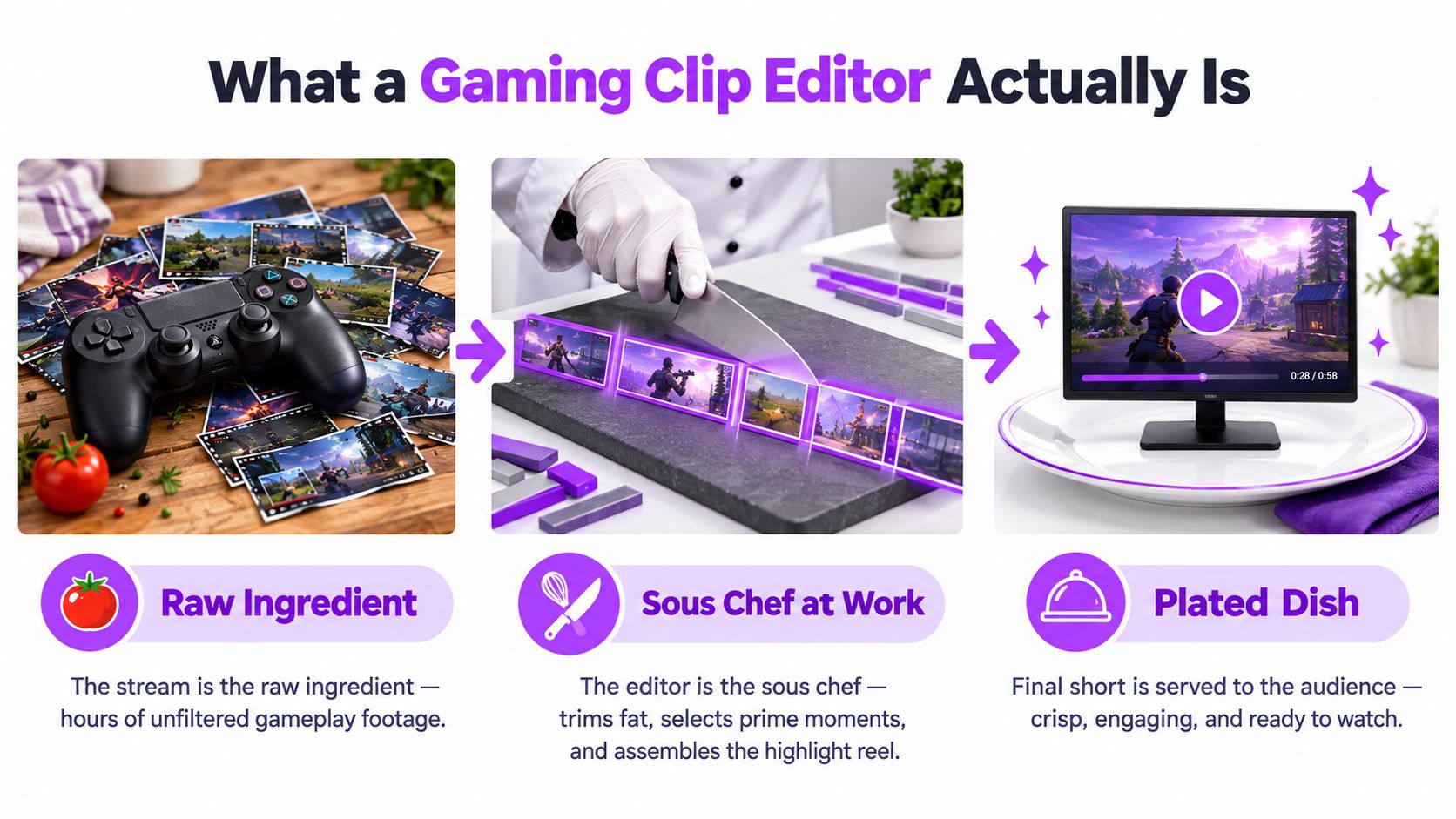
A good way to think about a gaming clip editor is this: your stream is the raw ingredient, and the editor is the sous chef.
The stream itself is messy. It has the good parts, but it also has loading screens, queue time, false starts, repeated callouts, dead air, and the random minute where you forgot you were muted. The editor’s job isn’t to create the content. The live stream already did that. Its job is to pull out the usable parts and serve them in a format people will watch on a phone.
Find the moment
First, the tool has to find candidate moments inside a long VOD.
That can mean looking for a burst of excitement in your voice, a spike in chat, a kill streak, a scream, a punchline, or a reaction worth isolating. Some creators still do this manually, especially when they know exactly what they want. Others pull moments through an ingest layer or API connection, such as a Captapi Twitch endpoint, when they need more structured access to clips or stream data inside a larger workflow.
The key idea is simple. Before anything can be edited, the best moments have to be surfaced.
Reframe the moment
Then the tool has to reframe the content for vertical viewing.
A stream is usually built for a wide screen. A short-form feed is not. So the editor has to take 16:9 footage and reshape it into 9:16 without cutting off the thing that matters most. In one clip, that might be your facecam and subtitles. In another, it might be the crosshair, the scoreboard, or the exact corner where a joke lands in chat.
A gaming clip editor differs from a general editor. It isn’t just shrinking and exporting. It’s making gameplay readable on a phone.
Distribute the moment
Finally, the tool has to distribute the finished clip.
That means exporting a file that already looks native to TikTok, Reels, or Shorts. In many workflows, it also means adding captions, platform-safe framing, title text, and a posting queue so the clip doesn’t die in your downloads folder.
The job isn’t “edit video” in the broad sense. The job is “turn stream footage into a publishable short with as few handoffs as possible.”
That’s why I don’t think of a gaming clip editor as a full non-linear editor in the Premiere or DaVinci sense. Those tools are deep and flexible. A gaming clip editor is narrower. It’s a purpose-built workflow tool for one very specific pipeline: stream to short-form clip.
Core Features That Matter for Gaming Clips
When people shop for a gaming clip editor, they often compare feature lists line by line. That’s understandable, but it misses the core question. Each feature is a trade you make between speed, control, and output quality.
The broader editing market shows why these trade-offs matter long term. Independent industry reporting places the video editing market at USD 3.54 billion in 2025 and USD 3.75 billion in 2026, with growth projected to USD 4.99 billion by 2031 at a CAGR of 5.88% in this video editing market overview. Editing software is already a mature business category. For gaming creators, that means fast clip workflows aren’t a novelty anymore. They’re becoming normal operating equipment.
AI clipping
The first feature people usually care about is AI clipping.
This is the part that reduces manual scrubbing. Instead of dragging through a two-hour VOD looking for a great thirty-second stretch, the system scans for likely moments. Different tools look at different signals, but the common goal is the same: surface the interesting parts before you touch the timeline.
That saves time, but it comes with a catch. AI can detect energy. It can’t always detect context. A loud reaction might be worth clipping, or it might need the ten seconds before it to make sense. That’s why the best use of AI clipping isn’t “publish whatever the machine picked.” It’s “start from ranked candidates, then review quickly.”
Vertical reframing
The second feature is vertical reframing.
This sounds mechanical until you try to do it badly. A weak crop can cut off your facecam, hide the kill feed, bury subtitles behind platform buttons, or turn a readable HUD into mush. A good tool keeps the important elements visible and balanced.
If you’re checking formatting standards, this guide on vertical video dimensions 2026 is useful for understanding how creators package clips for different short-form surfaces.
For gaming clips, the hard part isn’t only aspect ratio. It’s motion. Fast camera swings, chaotic fights, sudden zooms, and layered overlays can confuse automatic trackers. So the question isn’t “does it support 9:16?” Nearly every tool does. The question is whether the crop still makes sense when the action gets messy.
Captions
Captions matter more than a lot of new streamers expect.
In vertical gaming clips, subtitles often carry the joke, the reaction, and the setup all at once. Mobile readability matters here. Guidance for 1080x1920 vertical frames recommends keeping captions to 1 to 2 lines, aiming for roughly 25 to 30 characters per line, using high-contrast styling with either a semi-transparent black background or a 2-pixel outline, and sizing text around 64 to 72 px, with 48 px as a minimum, according to this vertical caption readability guide.
That sounds technical, but the takeaway is practical. If people can’t read your captions instantly, they skip.
Some editors burn captions directly into the video. Others keep them editable so you can fix gamer slang, names, or weapon terms. If you stream fast-moving games or use niche references, editable captions are worth a lot.
Auto-posting
The last feature that changes daily workflow is auto-posting.
The editor stops being “an editing app” and starts acting like a publishing system. Instead of exporting a file, renaming it, and manually uploading it everywhere, you push the clip into a queue and schedule distribution.
That’s a huge quality-of-life gain for anyone publishing often. It also introduces a new failure point. Connections expire, account permissions change, and platform rules shift. So don’t just ask whether a tool posts. Ask whether it posts reliably enough that you trust it.
For creators comparing AI-first workflows, this look at an AI video clipper is a useful reference point.
Here’s the quick comparison I use when advising creators:
| Feature | What It Does | Why It Matters for Gaming | Key Trade-Off |
|---|---|---|---|
| AI clipping | Surfaces likely highlight moments from long VODs | Cuts down the slowest part of the workflow, which is finding the clip | Can miss setup or pick loud moments that aren’t actually worth posting |
| Vertical reframing | Converts wide gameplay into phone-friendly framing | Keeps facecam, gameplay, and UI readable in short-form feeds | Auto-tracking can fail in fast motion or cluttered layouts |
| Captions | Adds subtitles for speech and reactions | Helps viewers follow clips on mobile and in sound-off viewing | Auto-captioning still needs review for slang, names, and game terms |
| Auto-posting | Sends finished clips to social platforms from one queue | Removes repetitive upload work across multiple channels | Platform connections can break, and automation reduces manual oversight |
How a Stream-to-Shorts Workflow Fits Together
Most confusion around clipping tools comes from seeing them as separate utilities. One app imports. Another edits. Another captions. Another schedules. That stack can work, but it creates handoff problems.
A cleaner way to think about it is as one chain.
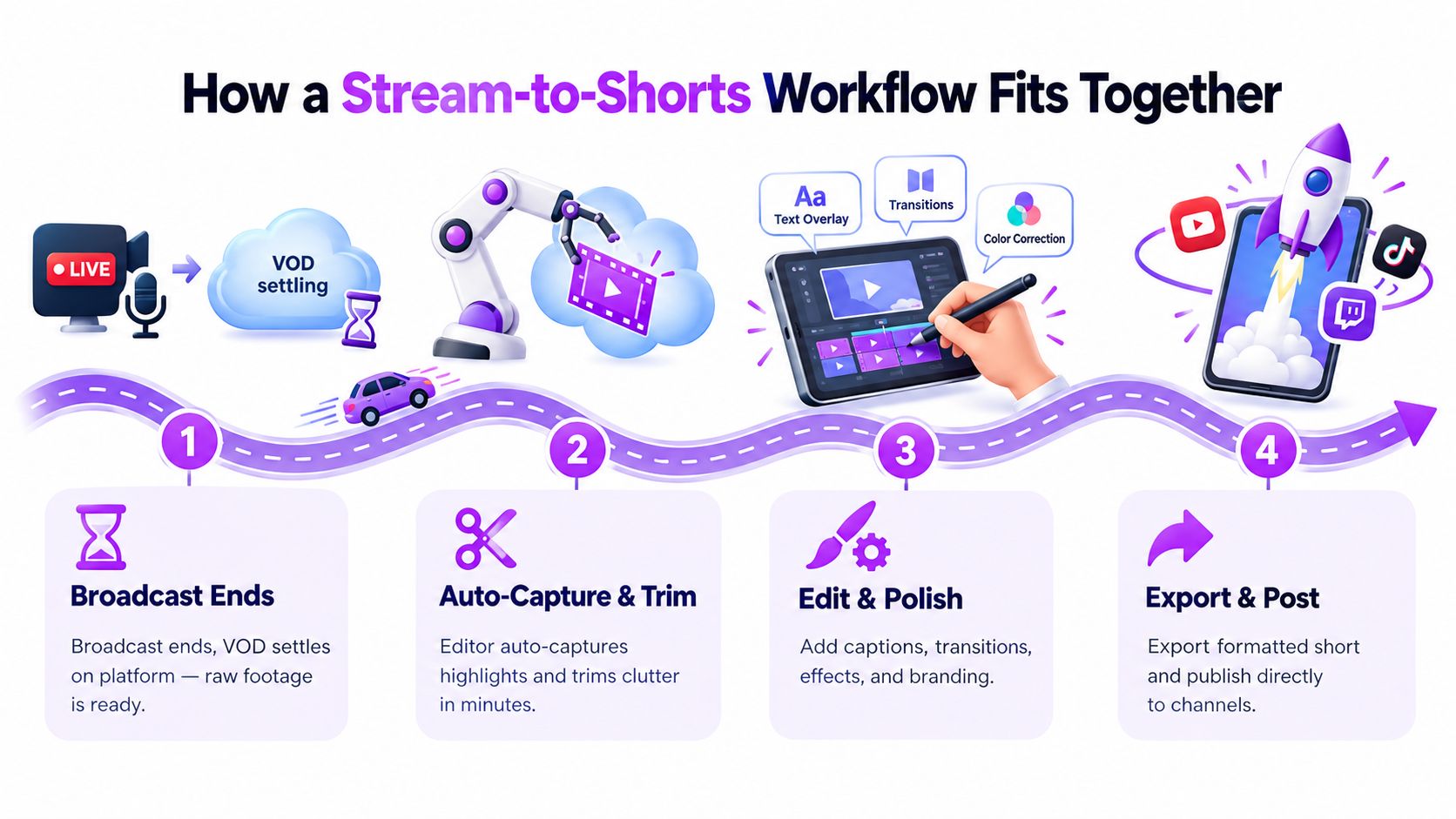
When the broadcast ends, the VOD has to land somewhere usable. That might be Twitch, YouTube, or a local OBS recording. The first handoff is simple: raw footage moves into the clipping workspace.
Ingest and detection
Once the footage is in, the tool starts scanning for candidate moments.
In a gaming context, that often means checking several signals at once. A sudden voice peak might suggest a reaction. A burst in chat might signal a joke landed. A key gameplay event might point to a clutch, wipe, or reveal. The goal isn’t to finish the clip here. It’s to reduce the giant VOD into a shortlist you can review without losing your whole evening.
Trimming and pacing
After a candidate is selected, the rough cut gets tightened.
Silence removal matters because automated silence removal and aggressive rough-cutting can change how polished a clip feels by stripping dead air, filler, and false starts between spoken beats. Silence detection tools typically let you tune settings like dB silence thresholds, minimum silence duration, and cut padding. That detail matters because gaming reactions can feel broken if the edit clips too close. This silence-removal workflow explanation is helpful if you’ve ever wondered why some auto-cuts feel snappy and others feel awkward.
A gaming clip doesn’t feel fast because every pause is gone. It feels fast because the boring pauses are gone and the reaction timing still survives.
Reframe, caption, review, queue
Then comes the packaging step. The clip is reframed for vertical, captions are layered in, and the creator does a quick review pass. Sometimes that pass is tiny. Maybe you just adjust the opening beat and correct one caption. Sometimes it’s larger because the crop missed the scoreboard or the funniest line started earlier than the tool expected.
One tool category that tries to keep this whole chain in one place is StreamGen. It combines AI highlight detection, a browser-based vertical clip editor, and direct posting in one workspace, and its AI shorts generator reflects that stream-to-shorts model.
From there, the last handoff is into a queue. Approved clips get assigned to TikTok, YouTube Shorts, or Reels and scheduled instead of left sitting in a folder named “post later.”
That single flow matters more than any isolated feature. A strong gaming clip editor doesn’t just help you edit faster. It removes the little stalls between steps where good content usually dies.
Matching the Editor to Your Creator Workflow
The same gaming clip editor can feel perfect for one person and wrong for another. That’s why I prefer matching tools to work style, not to hype.
Solo creator
The solo streamer usually has the most obvious problem and the least spare time.
They’re streaming at night, handling thumbnails or titles themselves, and trying to keep some kind of posting rhythm without hiring an editor. For this person, reliability beats depth. They need a tool that imports the VOD cleanly, finds decent candidate clips, makes vertical edits without much babysitting, and posts without ceremony.
What will they happily skip? Heavy collaboration features. Approval chains. Fancy team comments. If the tool saves them enough time that clips get published, it’s doing its job.
Esports social manager
An esports social manager lives in a different reality.
They’re not clipping one personality from one channel. They’re juggling rosters, match footage, sponsor expectations, and multiple social accounts. Their week is less about “find me a funny moment” and more about “get this out fast, keep branding consistent, and don’t publish the wrong version.”
For them, the useful extras are things like watermark control, brand presets, clean exports, and review checkpoints. They may trade away deep timeline tinkering if the system helps the team move quickly without mistakes.
The right tool for team social isn’t the one with the most editing toys. It’s the one that keeps approval, branding, and publishing from becoming chaos.
Agency editor
The agency or freelance editor sits closest to the traditional post-production world.
They often manage clips for several creators, and their problem isn’t only speed. It’s override power. They need to start with automation, then take over when the AI makes the wrong call. That means frame-aware trimming, caption styling control, and the freedom to fix pacing manually rather than fighting a locked workflow.
They may care less about one-click publishing because they already have a handoff process. But they care a lot about whether the tool respects editorial judgment.
Here’s a simple fit map:
| Persona | Top Priority | Nice-to-Have | Willing to Skip |
|---|---|---|---|
| Solo streamer | Fast automation that actually reduces manual clipping | Auto-posting and easy caption cleanup | Advanced collaboration features |
| Esports social manager | Brand-safe, repeatable output across multiple accounts | Review flows and reusable presets | Deep manual timeline control |
| Agency editor | Flexible editing control after AI has done the first pass | Export options and detailed caption styling | Fully hands-off posting |
Choosing the Right Gaming Clip Editor for You
Most creators don’t need the most advanced tool. They need the one that removes the biggest bottleneck in their current routine.
Start with the universal must-haves. A gaming clip editor should ingest your source footage without drama, handle vertical reframing in a way that keeps gameplay readable, produce captions you can trust after a quick review, and support stable publishing to the short-form platforms you use. If it fails on any of those, the rest doesn’t matter much.
Then separate the extras from the essentials. Multi-seat review, API access, brand kits, frame-precise overrides, and deeper audio control can be valuable. They’re just not equally valuable for everyone. If you’re a solo creator, some of those features are overhead. If you’re managing talent or clients, they may be the whole reason you buy the tool.
For broader comparison shopping, this roundup of best clipping software for gaming ads is useful because it frames clipping tools around different use cases rather than pretending one setup fits everyone. And if you want a more direct category comparison, this guide to best clipping software for games can help you pressure-test your shortlist.
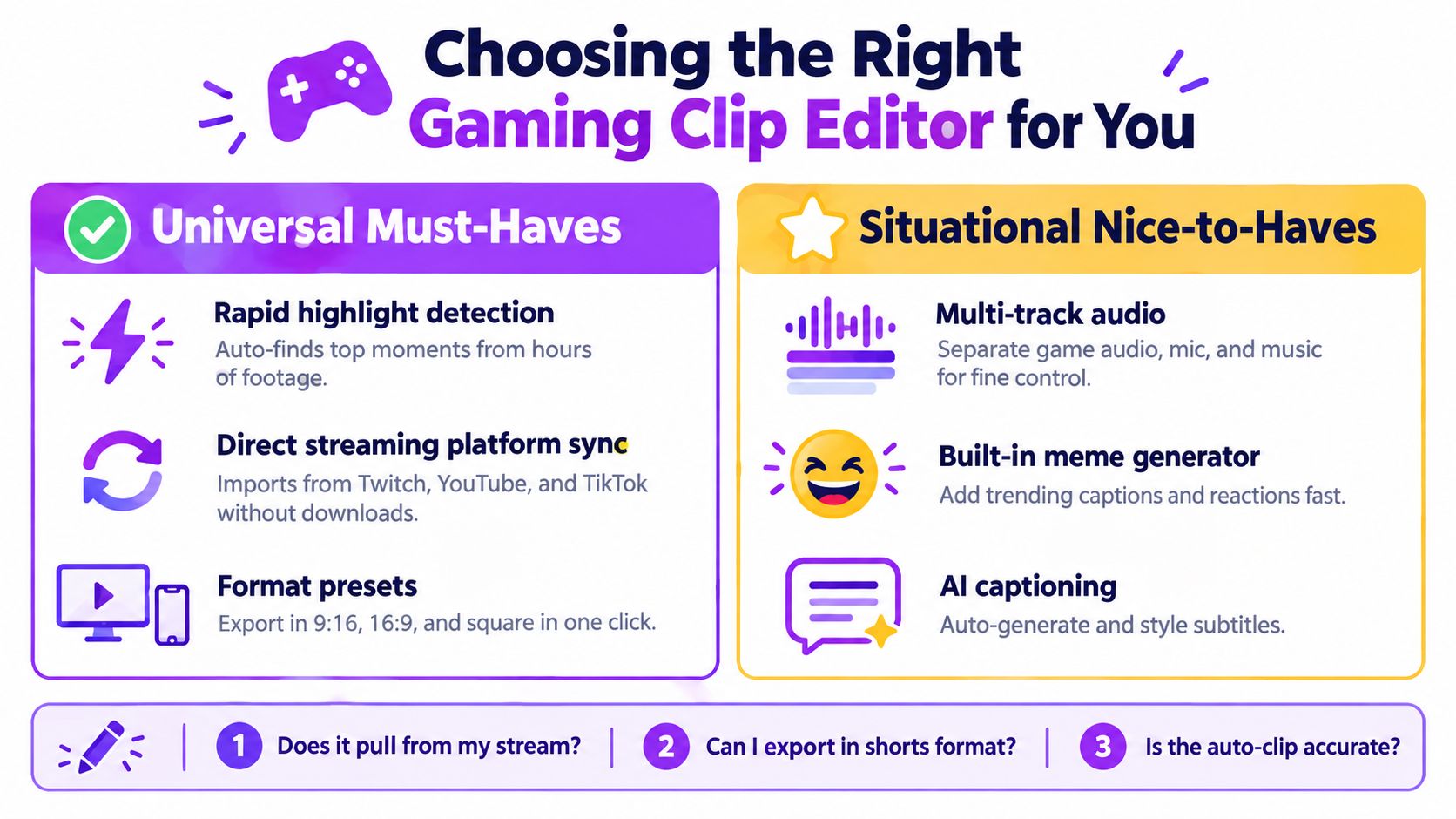
A ten-minute decision checklist
Use this when you’re evaluating any gaming clip editor:
- Ingest check: Can it pull from the platforms or recordings you already use without manual file juggling?
- Reframe check: Does the vertical crop preserve facecam, gameplay action, and important HUD elements?
- Caption check: Are the subtitles readable, editable, and strong enough for gaming slang and fast reactions?
- Posting check: Can it send clips where you publish, or will you still end up doing uploads by hand?
- Pricing check: Does the plan make sense for your current volume, not the creator business you hope to have later?
- Trial check: Can you test the workflow on your own VOD before committing?
The best choice usually isn’t the tool with the longest feature page. It’s the one that fits your week.
If your biggest problem is turning long streams into short-form clips without adding another pile of manual work, StreamGen is built for that exact workflow. It combines AI highlight detection, a browser-based vertical editor, and direct scheduling across short-form platforms, so you can move from VOD to publish queue in one place. If that matches how you want to work, take a look at StreamGen.
More blog posts