The term comes from aviation, and the history there carries a warning. Studies of airline fleets show that autopilot systems spread widely over more than a decade while accident rates stayed roughly flat during the same period. Automation alone did not make flying safer. What improved outcomes was pairing it with monitoring, clear exception handling, and a pilot able to take the controls at any moment.
A streaming autopilot process works on the same principle. It is a supervised loop: software finds, edits, and posts highlights, and the creator watches each decision and can override it. The practical goal is removing repetitive work while keeping visible boundaries and a fast way to step in when a clip needs human judgment.
Table of Contents
- What the Autopilot Process Actually Does
- Where the Autopilot Idea Comes From
- How the Find Edit and Post Stages Work Together
- Signals and Controls That Keep Autopilot on Track
- Typical Autopilot Workflows for Different Streamers
- Choosing How Much Automation to Hand Over
- Putting the Autopilot Process to Work
What the Autopilot Process Actually Does
Patreon’s State of Create 2025 reports that 91% of surveyed professional creators use AI, while time pressure, burnout, and algorithm complexity remain daily problems (Patreon’s State of Create 2025). That adoption figure helps explain why streamers are looking beyond isolated editing tools. The practical meaning of an autopilot process is straightforward: it connects highlight discovery, clip editing, and social publishing into a supervised loop.
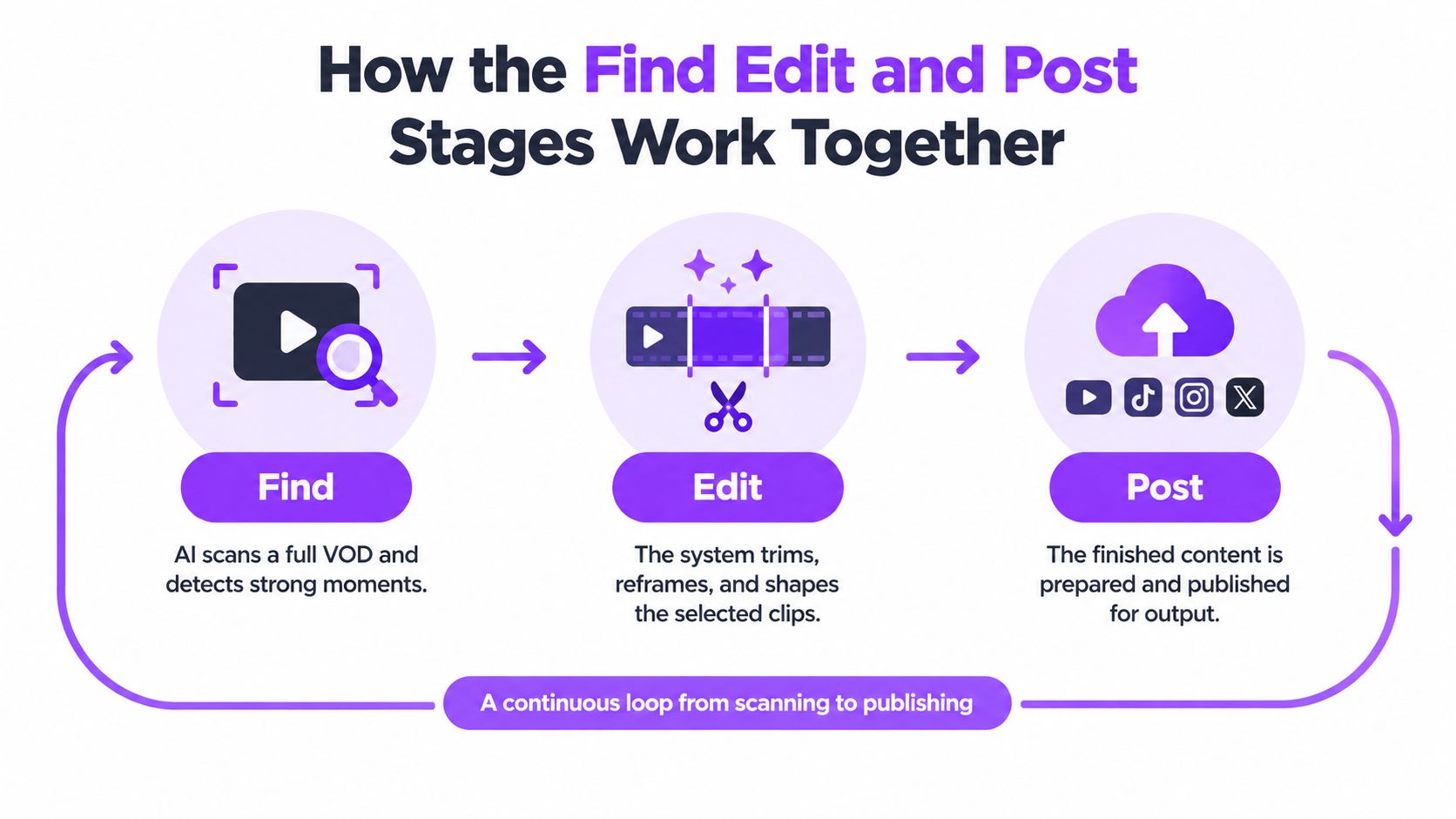
First, the system scans a stream recording, or VOD, and identifies moments that could work as short clips. Next, it shapes selected moments into vertical videos, with elements such as reframing, captions, and titles. Then it prepares or publishes those clips to connected platforms. The creator can review decisions along the way, adjust the queue, or stop a post from going out.
That connected workflow is different from generic automation that performs a single task. A clipping tool might find moments but leave editing and posting to the creator. A scheduler might publish files but do nothing to help find or shape them. An autopilot process links these jobs so an output from one stage becomes the next stage’s input, while the creator remains able to supervise the whole chain. For a broader introduction to how connected workflows can handle repeatable tasks, see these real-world examples of AI automation.
The streamer’s role doesn’t disappear
The machine can do the repetitive work of scanning, trimming, formatting, and queueing. The creator still decides what fits the channel, what needs context, and what should never be posted. A high-energy reaction might look like a strong candidate to an algorithm, but a person can recognize that it involves a private conversation, an accidental disclosure, or a joke that doesn’t make sense without the surrounding stream.
This distinction matters for Twitch streamers, VTubers, Just Chatting creators, esports teams, and agencies. A solo streamer may want a queue ready after a broadcast. An agency may need a consistent workflow across several accounts. Both need ways to review exceptions and protect channel-specific rules.
The term sounds simple because its three actions are easy to name: find, edit, and post. The important design question is how those actions stay connected to human judgment. That question becomes clearer when you look at where autopilot began.
Where the Autopilot Idea Comes From
Aviation got to the word first. Early aircraft autopilots appeared in the first decades of powered flight, and later generations moved beyond basic stabilization to manage heading, altitude, speed, and navigation. Over time, advanced automation spread across a large share of the commercial airline fleet. Yet accident rates during the period when these systems became widespread stayed roughly flat, as noted earlier.
That history doesn’t mean automation lacked value. It shows that automating actions doesn’t, by itself, solve the problem of operating a complex system safely. Investigations pointed to weaknesses during transitions from automation to manual control: incorrect inputs, missed automation disconnects, poor energy management, and insufficient monitoring of speed or thrust.
The pattern is consistent. Pilots still needed to understand what the system was doing at every moment and respond when conditions changed.
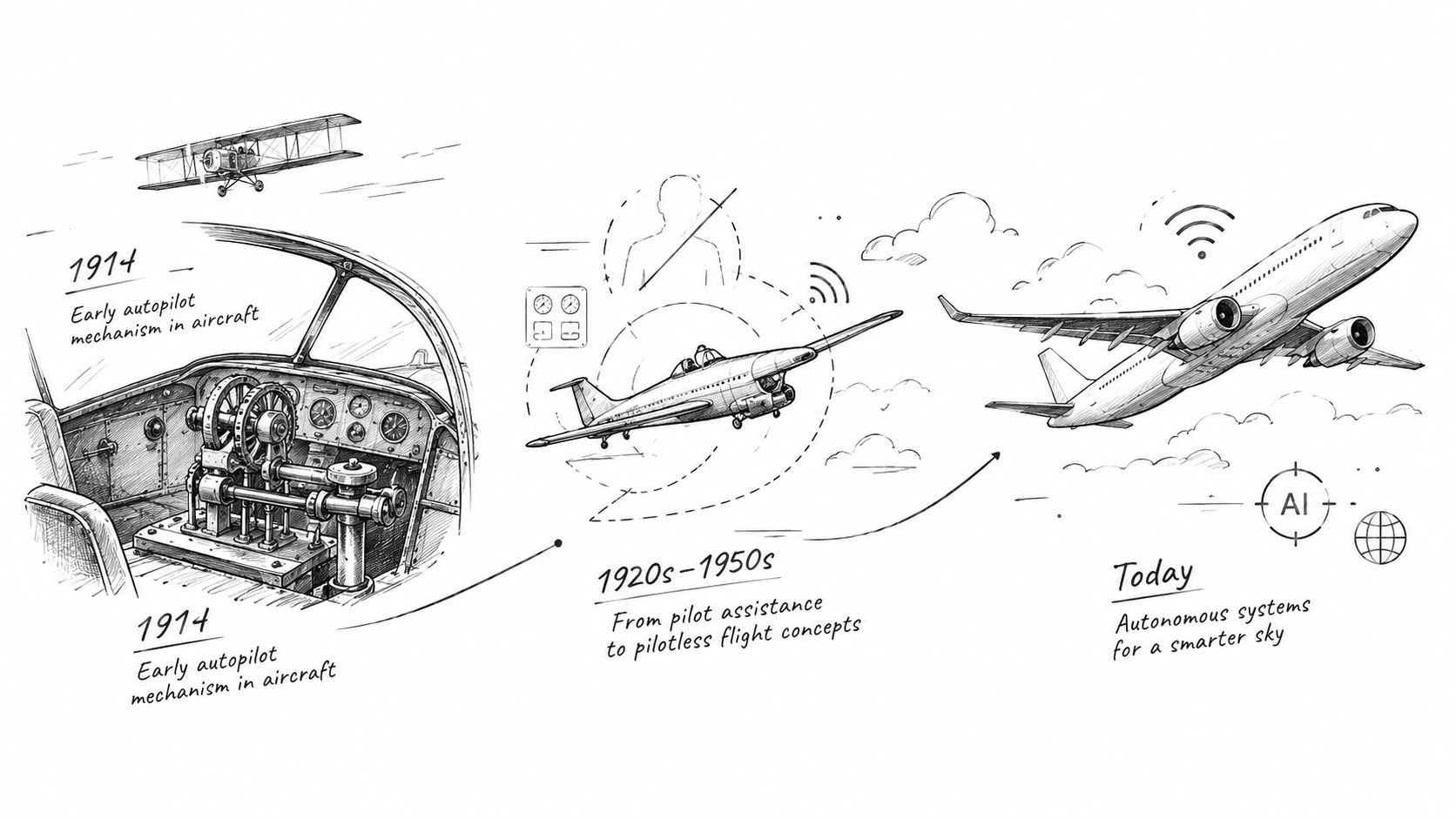
From flight deck to stream dashboard
A streaming workflow carries far lower stakes than a flight deck, but the design lesson transfers: supervision, exception handling, and manual override belong inside the automated process. They aren’t emergency add-ons to bolt on after the system is already running.
A creator needs to know whether a VOD is being analyzed, which clips are waiting for review, what has been scheduled, and whether a platform rejected a post. If the system stalls or selects an inappropriate moment, the person operating it should be able to pause the queue, correct the selection, or take over manually.
Practical rule: If you can’t tell what the automation is doing or stop it from acting, you can’t supervise it effectively.
A well-designed workflow treats every automated decision as a proposal until a person confirms it. Throughput gains hold because oversight was designed in from the start, not because the software happened to guess right.
How the Find Edit and Post Stages Work Together
The workflow starts with the VOD and ends with a clip prepared for a social feed. At each handoff, the system should make clear what it selected and what happens next.
Find candidate moments
The input is a full stream recording. An AI Clip Finder can scan long VODs, including streams eight hours or more, using gameplay, reactions, chat, and audio cues to rank candidate moments. Instead of scrubbing the entire timeline by hand, the creator gets a shorter list of clips to inspect.
Ranking is not the same as deciding what should be published. A sudden burst of chat or a loud reaction may be worth a look, but the system can miss context that makes a moment unsuitable. At this handoff, a human can remove a candidate, mark it for closer review, or let it continue to editing.
Edit for the destination
The selected moment becomes a vertical clip. Editing can include reframing to keep gameplay and facecam readable, adding animated captions, removing silence, and generating a title hook. The creator should be able to adjust the crop and text, since a technically correct edit can still obscure important gameplay or misrepresent what happened.
Sound deserves attention too. A useful audio-editing checklist can help you check audio edits before exporting, especially when trimming dead air or balancing a reaction against game audio. The result of the edit stage is a finished clip, or a draft that still needs approval.
Post into a queue
The final stage schedules clips for connected TikTok, YouTube Shorts, and Instagram Reels accounts. A queue lets publishing continue while the streamer is live, without requiring a creator to download and upload each finished file by hand. Before a post goes out, the workflow can pause for approval, request confirmation, or apply rules the creator has set.
The handoffs matter as much as the tasks themselves. A moment found in the VOD becomes an editable draft; an approved edit becomes a queued post. If one stage fails, the system should show where and let the creator recover the clip rather than losing it.
Signals and Controls That Keep Autopilot on Track
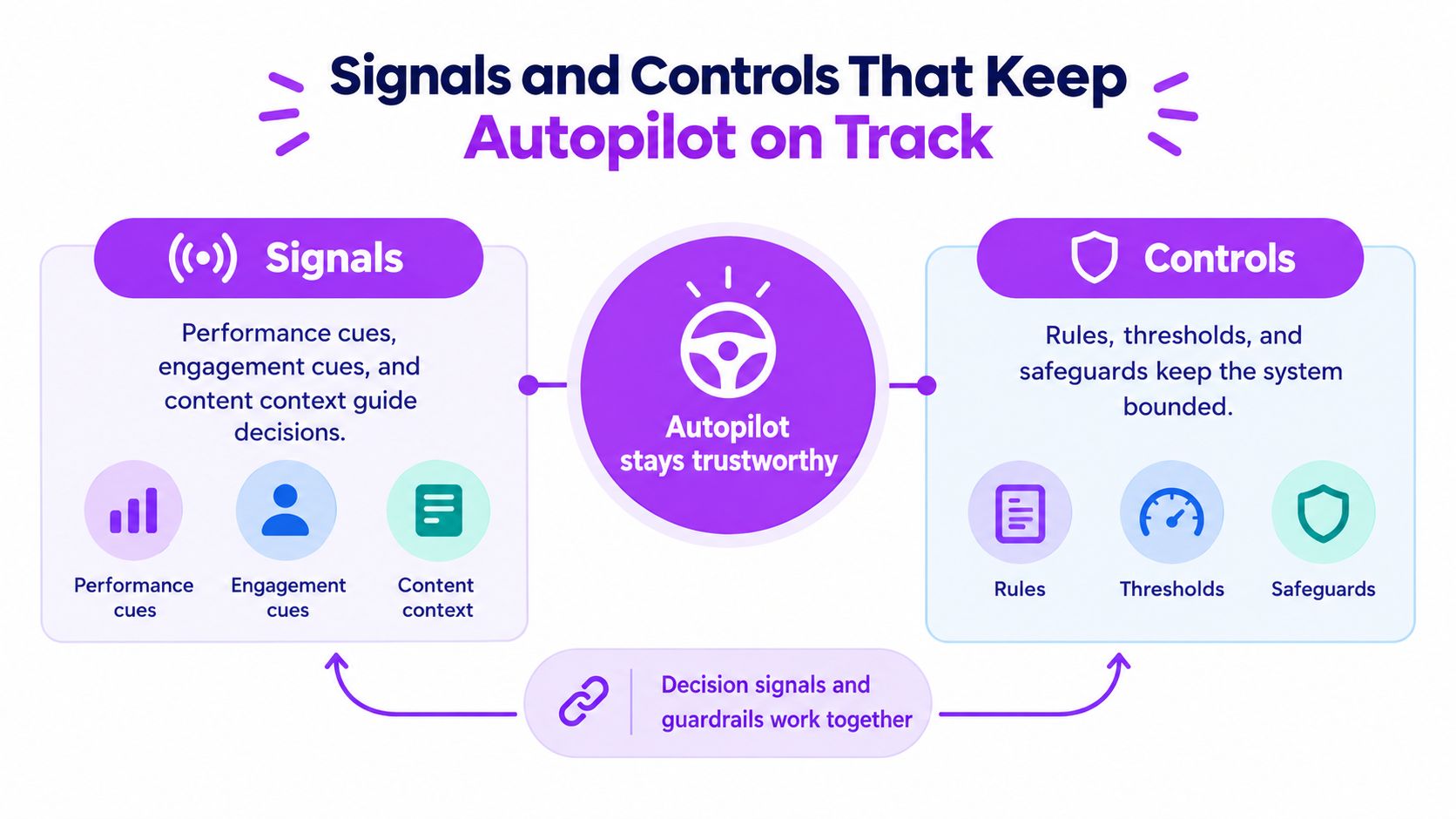
A trustworthy system needs both signals to guide its choices and controls to limit what it can do. Signals help identify moments that may work as clips. Controls make sure the system doesn’t turn a promising signal into an inappropriate post without the right checks.
Signals help rank moments
A clip finder can combine gameplay events, on-screen reactions, chat activity, and audio cues. A game-changing play might stand out through a visible event and a burst of reaction. In Just Chatting, an engaging exchange may be indicated more by conversation and audience response than by gameplay. Creators can also tune the system by describing what makes a moment fit their channel.
Those cues are useful for sorting a long recording, but they don’t prove that a clip is ready to publish. A funny moment may depend on earlier context. A reaction may involve a sensitive subject. The system’s score should help the creator focus attention, not pretend that context can always be reduced to a number.
Controls make review possible
The monitoring risk isn’t hypothetical. A 1994 U.S. National Transportation Safety Board review examined 37 major airline accidents from 1978 through 1990 and found that faulty or inadequate monitoring contributed to 31 cases, approximately 84%. The finding doesn’t mean automation caused every accident. It illustrates how the human role can shift from active control to supervision, and how supervision can fail when people lose situational awareness (research on automation bias and monitoring).
A useful streaming workflow makes oversight concrete:
- Set confidence thresholds so low-confidence picks go to review rather than straight to publishing.
- Use preview and approval modes while checking whether the system understands the channel.
- Show why a clip was selected, such as the gameplay event, reaction, or chat activity that triggered it.
- Add duplicate detection and posting confirmations to catch repeated clips or unintended uploads.
- Write never-post rules for topics, guests, or situations that require manual judgment.
- Keep an audit trail and error alerts so the creator can see why a moment was found, edited, scheduled, or blocked.
For example, a streamer using a Twitch clip finder can treat its ranked moments as a review queue rather than a publishing order. The system narrows the search; the creator still sets the boundaries.
Typical Autopilot Workflows for Different Streamers
A solo Twitch streamer may want a fresh queue built from each VOD while the next broadcast is already underway. The system identifies candidate moments, trims them into vertical drafts, and keeps approved clips in a scheduled queue. The streamer reviews anything marked uncertain, while routine formatting and scheduling stay automated.
A VTuber or Just Chatting creator may use a more cautious setup. Context and community norms can matter more than an audio spike, so candidate clips go to approval before editing or posting. The system can still find likely moments and prepare drafts, but the creator decides whether jokes, guest appearances, and personal disclosures belong on the channel.
Team and agency workflows
An esports social manager may want to process match VODs for several team accounts. The workflow can surface notable plays and prepare versions for different channels, while the manager checks team rules, sponsorship obligations, and whether a moment needs match context. For creators working with products or selling during streams, a guide to live commerce gear can help with the production setup that surrounds that content.
An agency handling multiple streamer accounts has a different concern: consistency without flattening each creator’s voice. Editors can use channel-specific presets and posting rules, then review exceptions in a shared workflow. Automation can handle repeatable formatting, but a person still decides whether a clip suits a particular creator and campaign.
Cross-platform publishing needs similar care. A moment that works on TikTok may need a different opening, caption, duration, or call to action for YouTube Shorts or Instagram Reels. Research on recommendation systems highlights how little creators can know about changing platform rules, while creator reports describe the pressure to repackage content for different networks. So an autopilot process should support platform-native variations and keep experiment notes, rather than assuming one edit will perform identically everywhere.
In each workflow, the division is clear: automation finds, prepares, and organizes; a person handles context, permissions, brand judgment, and exceptions.
Choosing How Much Automation to Hand Over
Creators don’t have to choose between doing everything by hand and letting a system publish without review. Think of automation as a spectrum: manual clipping gives the creator the most direct control, assisted automation shares the work, and hands-off operation delegates routine actions within rules.
| Mode | Who Picks the Clips | Review Before Posting | Best For |
|---|---|---|---|
| Manual | Creator selects moments from the VOD | Creator edits and posts each clip | Channels with highly sensitive context or a distinctive editorial style |
| Assisted | AI surfaces and edits candidates, creator chooses | Approval before posts go live | Most streamers starting with automation |
| Hands-off | System selects and prepares clips within set rules | Review exceptions and audit outcomes | Established workflows with clear never-post rules and reliable oversight |
Assisted mode is a sensible starting point for most streamers. You get relief from scrubbing and repetitive editing without treating a model’s selection as an automatic green light. Check the audit trail over time: do the clip picks make sense, do the edits preserve context, and do posts follow the channel’s rules?
Hands-off automation makes more sense after those boundaries have been tested. Set confidence thresholds, define content that should never be posted, and check how the system handles failed posts and uncertain selections before widening its freedom.
StreamGen offers one example of a unified workflow: Autopilot coordinates finding, editing, and posting alongside its AI Clip Finder, Clip Editor, and Auto Posting tools. Creators can adjust how much review each channel needs rather than stitching together separate apps. A Twitch VOD editor can also be useful when a creator wants to refine a recording in a more traditional editing workflow.
Putting the Autopilot Process to Work
The aviation lesson is that reliable automation depends on people being able to monitor it, handle exceptions, and take control. In a streaming workflow, the find-edit-post loop can take care of repetitive production work, while visible signals, approval points, and a clear audit trail keep the creator involved in meaningful decisions.
Start with one connected channel and use assisted mode on your next VOD. Review the audit trail: check whether the selected moments make sense, whether the vertical edits preserve the important action, and whether the queue fills without manual file handling. If something goes wrong, make sure you can identify the failure and stop or correct the next step. For a practical overview of auto-posting to social media, consider how the publishing handoff fits your channel’s approval rules.
StreamGen brings highlight detection, a browser-based clip editor, and scheduling for TikTok, YouTube Shorts, and Instagram Reels into one workspace, with optional Autopilot for the connected workflow. Try it in assisted mode first, then visit StreamGen to see whether its review and publishing controls fit the way you run your channel.
More blog posts