You settle into a long Twitch stream, the chat is flying, and just as the streamer reaches the important part, playback cuts to another commercial break. You reload, change browsers, search for a new extension, and discover that yesterday’s recommendation either disappeared from an extension store or stopped working after Twitch changed its player.
That frustration explains the continuing search for an ad block for Twitch, but the modern answer isn’t a single switch. Twitch’s delivery architecture has changed, unofficial tools carry real account risks, and the most dependable solution depends on whether you’re a casual viewer, a regular supporter, or a creator trying to reach people beyond live playback.
Table of Contents
- Why Viewers Search for an Ad Block for Twitch
- How Twitch Ad Delivery Changed the Playing Field
- Browser Extension Approaches and What Actually Works Now
- Official Options and the Twitch Prime Trade-Off
- Security Risks and Account Trust Issues Most Guides Ignore
- Practical Steps and Safer Alternatives for Viewers and Creators
Why Viewers Search for an Ad Block for Twitch
The search usually starts with an interruption, not a technical problem. You open a favorite channel expecting to watch a match, a speedrun, or a conversation, and the stream pauses before you’ve even settled in. Later, another break arrives while the creator is explaining something important. In a long broadcast, those interruptions can make the experience feel less like a continuous hangout and more like a series of stops and starts.
Viewers also search because they want control. A browser ad blocker can remove banners and overlays on many websites, so it feels reasonable to expect the same result on Twitch. That expectation becomes harder to satisfy when the advertising is part of the video stream rather than a separate page element.
The platform’s audience makes the issue especially visible. Independent 2026 coverage cited by Athens Journal of Mass Media and Communications describes ad blocking as especially common among gaming audiences, with one dataset placing usage at about 64% of gamers and desktop usage among some 18-to-24-year-old groups at roughly 60%. Those figures don’t describe every Twitch viewer, but they show why standard ad monetization can struggle with the exact audience gaming advertisers want to reach.
The practical reality: viewers aren’t searching for a clever filter. They’re searching for uninterrupted access to a familiar viewing routine.
What viewers expect from a fix
Viewers generally expect three things:
- Fewer interruptions: They want pre-roll and mid-roll breaks reduced without constantly refreshing the player.
- Stable playback: A method that works today but breaks every time Twitch updates its player isn’t a dependable solution.
- Low account risk: No viewer wants to trade an ad break for a compromised Twitch account.
That final point matters more than many older guides admit. Search results often present ad blocking as a harmless utility choice, even though some tools bundle it with automation, playback manipulation, or account-related permissions. Before exploring technical workarounds, it helps to understand why the old browser approach became unreliable and why creator discovery increasingly happens outside the live player. Viewers interested in the wider ecosystem can also browse streamer workflows to see how creators organize content beyond a single live broadcast.
How Twitch Ad Delivery Changed the Playing Field
Traditional browser blockers are strongest when an ad is a separate request or a visible page element. They can identify a known advertising domain, stop the request, or hide a banner after the page loads. Twitch’s current delivery model is different. Ads are commonly handled through server-side ad insertion, where Twitch stitches advertising into the video feed before playback reaches your browser, as described in this technical overview of Twitch ad blockers for Chrome.
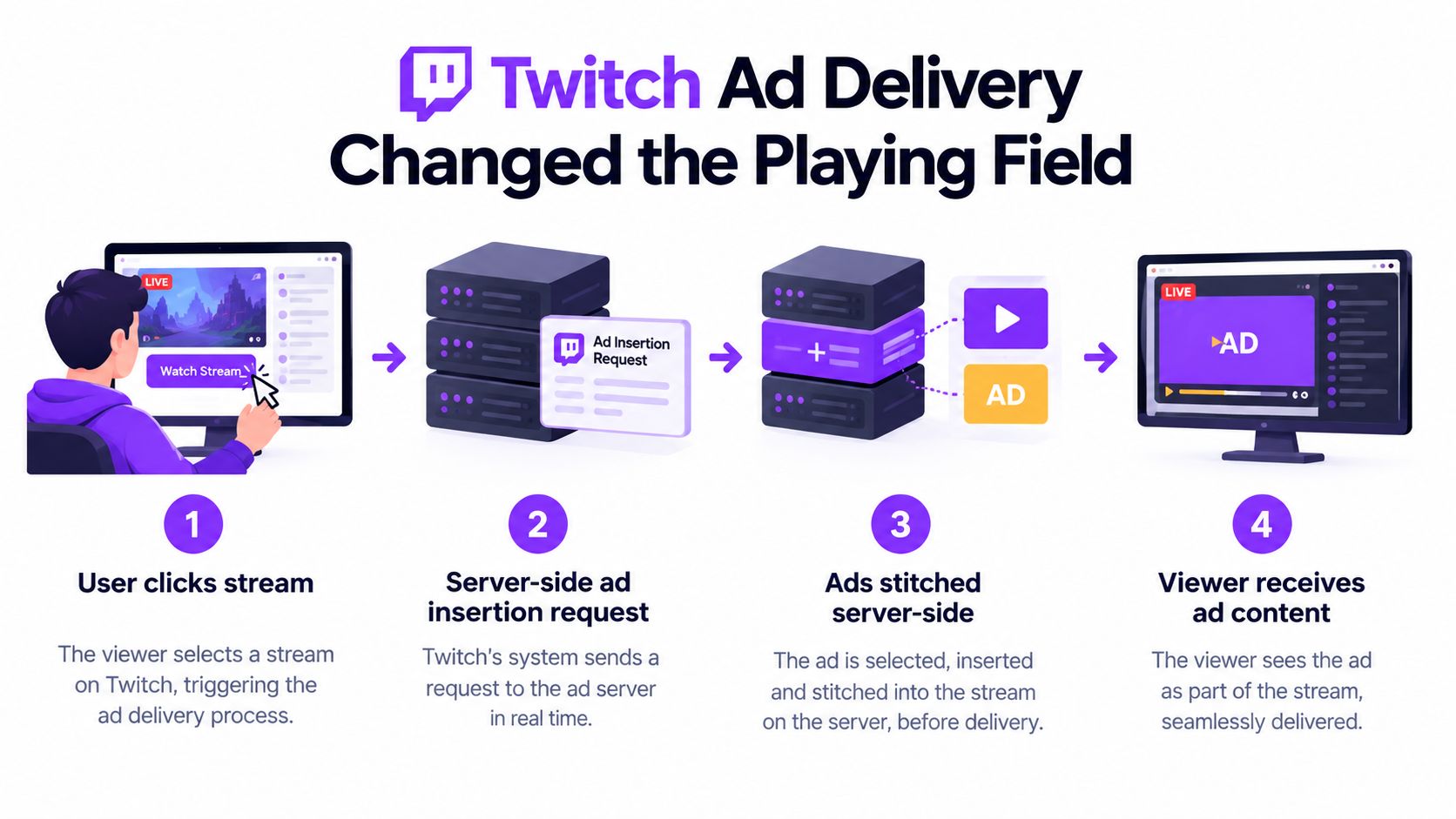
The sequence is straightforward. You request a stream, Twitch’s servers determine whether an ad should be delivered, the advertising segment is stitched into the same HLS or CDN path as the broadcast, and your player receives the resulting feed. From the browser’s perspective, the ad can look like part of the stream rather than a detached object waiting to be filtered.
That architectural choice explains why many older recommendations now disappoint. An extension that only hides a player element can’t remove video content already delivered as part of the feed. A filter designed to block a separate advertising request may also fail because the stream and advertisement share the same delivery route.
Why workarounds keep breaking
Twitch controls the player, the delivery logic, and the format of the stream. When those components change, an extension has to adapt quickly. A tool can appear effective for a while, then produce buffering, a blank player, repeated reloads, or an account prompt instead of a clean viewing experience.
The removal of a popular extension illustrates the scale of interest, but not permanent technical success. BleepingComputer reported in September 2026 that the Twitch AdBlock extension had more than 150,000 users and was generating 6 million daily views before removal from the Chrome Web Store and Firefox Add-ons, as summarized by PCrisk’s Twitch ad blocker coverage. That level of usage indicates substantial demand, yet marketplace removal also shows how quickly distribution and availability can change.
A blocker can be popular, widely recommended, and still be a poor long-term dependency if its delivery channel disappears.
The useful distinction is between page-level blocking and feed-level manipulation. The first remains familiar and relatively predictable. The second is more fragile, more dependent on frequent maintenance, and more likely to create compatibility or trust problems. That distinction should guide how you evaluate every current recommendation.
Browser Extension Approaches and What Actually Works Now
Browser extensions still fall into several practical categories, and they shouldn’t be judged as if they offer the same protection.
A basic content blocker can clean up page advertising, trackers, and interface clutter. It may improve the surrounding Twitch page while leaving video ads untouched. A Twitch-specific extension may attempt script-level suppression, player replacement, or stream manipulation. Those methods can sometimes reduce interruptions, but their performance depends heavily on current Twitch behavior and the developer’s ability to maintain the tool.
A third category includes tools that once worked reliably but were removed, abandoned, or forced into repeated updates. Marketplace availability is not proof of effectiveness, and removal isn’t proof that every prior version was malicious. It does mean you should check the tool’s current status instead of trusting an old recommendation.
A better way to judge an extension
Look for signals that tell you whether a tool deserves access to your browser:
| Signal | What it tells you |
|---|---|
| Recent maintenance | The developer is responding to browser and Twitch changes. |
| Narrow permissions | The extension asks for access related to its stated function, not unrelated account control. |
| Clear documentation | You can understand what the tool changes and what it cannot block. |
| Transparent distribution | You can identify the developer and obtain updates from a reputable channel. |
| Predictable failure behavior | A failed blocker leaves the player usable instead of demanding credentials or disabling security controls. |
Avoid recommendations that promise permanent, universal blocking. Twitch can change delivery behavior, and no browser add-on can guarantee control over a service it doesn’t operate. If you decide to test a tool, use a separate browser profile, review permissions before installation, and remove it when it stops receiving credible maintenance.
For creators and agencies, this matters from the opposite direction. If your audience relies on blockers, standard live ad exposure becomes less dependable. Stronger distribution often comes from turning compelling stream moments into clips, as explained in this practical guide to making clips on Twitch. Teams planning paid acquisition should also separate audience distribution from ad-serving assumptions, and resources such as Nereo for performance marketing can help frame that broader media decision.
Extensions versus supported options
Unofficial tools may reduce interruptions without a recurring payment, but they demand maintenance and trust. Official options cost more or require a commitment, yet they keep the viewing relationship inside Twitch’s supported ecosystem. Neither route is perfect. The right choice depends on how often you watch, how much you value stable playback, and how much account exposure you’re willing to accept.
Official Options and the Twitch Prime Trade-Off
The assumption that an ad blocker is harmless falls apart when the tool needs deep access to the Twitch page or your account. Official viewing options have a different trade-off. You give up some money or channel-level commitment, but you gain a supported path that doesn’t depend on an extension racing Twitch’s next player update.
Twitch Prime, commonly associated with Prime Gaming, and channel subscriptions can remove certain ad interruptions under the conditions Twitch and the channel apply. The benefit is consistency. You aren’t installing a tool that intercepts page behavior, and you aren’t handing a third-party extension more access than it needs.
That doesn’t make subscriptions a universal answer. A casual viewer may not watch one channel often enough to justify the commitment. A regular viewer who spends a lot of time with a particular creator may see more value in supporting that channel while improving the viewing experience. The decision should reflect your actual habits, not the promise of a universal “free” blocker.
Cost, commitment, and control
Consider the trade-off plainly:
- Third-party extension: Lower direct cost, but uncertain durability and a wider range of security questions.
- Prime-related benefits: Supported access tied to the relevant account arrangement, but not a universal replacement for every form of advertising.
- Channel subscription: Direct creator support and possible ad benefits on that channel, but it applies to the subscribed channel rather than all Twitch viewing.
- No blocking: Maximum compatibility, with the inconvenience of interruptions.
Platform terms also matter. An unofficial tool may interfere with how Twitch expects its service to operate. That doesn’t automatically mean every blocker will trigger an account penalty, but it does mean viewers should read claims carefully and understand that technical possibility isn’t the same as platform support.
Safer choice: if an official option meets your viewing needs, it removes an entire class of extension and OAuth risk.
Some viewers still prefer an unofficial route because they want to avoid payment or channel commitment. If that’s you, treat the extension as untrusted software until you’ve checked its permissions, developer history, and removal options. A clean interface isn’t a security review.
Security Risks and Account Trust Issues Most Guides Ignore
The most dangerous part of a Twitch blocker may not be the ad filtering. It may be the extra functionality packaged beside it.
Recent reporting described a widely installed Twitch extension marketed with ad blocking and viewer enhancements that exposed users’ OAuth tokens, affecting more than 30,000 installs, according to Cybersecurity News’ report on a malicious Twitch extension. An OAuth token can act as proof that an application has been authorized to interact with an account. If a malicious extension captures it, changing a password may not be enough unless you also revoke the relevant authorization.
A plain blocker has a narrow purpose. Extensions that also promise channel-point automation, region unblocking, playback manipulation, or enhanced viewer controls may request broader access and run more complex code. Every added feature creates another place where a developer can make a mistake, a dependency can be compromised, or a malicious operator can hide harmful behavior.
Permission checks that deserve attention
Before installing anything, ask:
- Why does it need this permission? A tool that modifies Twitch playback may need page access, but unrelated account permissions deserve scrutiny.
- Who maintains it? Look for an identifiable developer, clear release history, and recent updates.
- Can you revoke access? Know where Twitch lists authorized applications before you test the extension.
- What happens after removal? Uninstall the extension, clear its stored data where appropriate, and revoke permissions that you no longer recognize.
- Does the promise sound permanent? Claims that ignore Twitch’s changing delivery system are a warning sign.
Browser-store approval isn’t a safety guarantee. Stores can remove harmful extensions after detection, but installation still exposes users during the period before discovery and response. Keep your browser, operating system, and password manager updated, and don’t paste Twitch credentials into an extension’s own prompt.
Creators face a related problem. If viewers move away from live playback because interruptions are exhausting, discovery can suffer unless the creator offers useful entry points elsewhere. Building an active audience through Twitch community strategies and distributing concise highlights gives people another way to encounter the channel without asking an ad blocker to solve every viewing problem.
Practical Steps and Safer Alternatives for Viewers and Creators
Viewers can make a sensible decision without chasing every new extension. Start by choosing the least invasive method that fits your habits, then monitor the account and playback experience after every change.
A viewer checklist
- Try supported playback first. Consider Twitch’s official account and subscription options if you watch particular channels regularly.
- Separate page cleanup from video blocking. A general content blocker may reduce banners and trackers, but don’t assume it can control server-delivered video ads.
- Research maintenance before installation. Check the developer, recent updates, documented permissions, and independent security reporting.
- Use a separate browser profile for testing. Keep experimental tools away from saved sessions and unrelated accounts.
- Review authorized applications. Remove Twitch access you don’t recognize, especially after uninstalling a tool.
- Stop at the first warning sign. Unexpected login prompts, strange redirects, repeated buffering, or unexplained account activity aren’t problems to troubleshoot indefinitely.
- Support creators directly. Subscriptions, legitimate donations, and viewing their clips help creators without requiring risky software.
Creators should assume that a portion of their audience will use ad blocking or skip interruptions. That doesn’t mean abandoning live streaming. It means giving each strong moment more than one chance to be discovered. A clean vertical clip, a readable caption, and a strong opening can introduce a viewer on TikTok, YouTube Shorts, or Instagram Reels before that person ever opens a live channel.
For longer-term planning, Twitch influencer marketing in 2026 offers useful context for brands and creators thinking beyond standard ad inventory. Creators should also preserve their broadcasts and organize reusable moments, following a dependable workflow for saving a Twitch stream, so a live session can continue working after the broadcast ends.
Creator rule: don’t make one live player responsible for discovery, retention, and monetization. Give your best moments a distribution path that doesn’t depend on uninterrupted ad exposure.
The practical answer to “what should I install?” is often “nothing yet.” Test supported options first, treat extension permissions as a security decision, and stop relying on stale guides that promise permanent results. For creators, invest energy in searchable clips and repeatable distribution rather than trying to defeat every viewer’s playback setup.
StreamGen turns Twitch VODs into short-form clips for TikTok, YouTube Shorts, and Instagram Reels using AI highlight detection, vertical reframing, animated captions, silence removal, and direct scheduling. If you want your strongest stream moments to reach viewers without depending on uninterrupted live playback, visit StreamGen and build a safer distribution workflow.
More blog posts