You upload the video, confirm it’s public, and wait for the first trickle of traffic. An hour later, the counter still says zero. You refresh Analytics, close TikTok, reopen it, and check again. Nothing.
That moment creates the wrong instinct. Most creators immediately blame the idea, the hook, the caption, or the hashtags. Sometimes the content is weak, but TikTok zero views is usually a triage problem before it’s a content-quality problem. You need to determine whether the upload is still processing, the distribution layer has filtered it, or the account itself has a restriction.
The practical response is simple: check the platform and account signals first, then inspect the creative. A stronger video can’t fix a post that never entered recommendation, and clearing the cache won’t rescue a clip viewers instantly skip. The right diagnosis saves you from deleting a healthy upload or endlessly editing a restricted account.
Table of Contents
- The Moment Your Video Gets Stuck at Zero Views
- What Zero Views Actually Means in 2026
- Diagnosing the Real Cause Inside TikTok Studio
- Fixing the Content So the For You Page Picks It Up
- Reposting and Repurposing Without Triggering Filters
- What Actually Works During a Suppression Window
- Your Zero-Views Recovery Checklist
The Moment Your Video Gets Stuck at Zero Views
I’ve seen creators make the same mistake repeatedly. They post a clip, watch the counter sit at zero, and start changing everything at once. The caption gets rewritten, hashtags are replaced, the sound is swapped, and the video is deleted before anyone has confirmed whether TikTok finished processing it.
That reaction feels productive because it creates movement. It also destroys the evidence you need. If you delete the post immediately, you can’t tell whether the upload was pending review, hidden by a privacy setting, or blocked by an account-level issue.
Treat the problem like triage
Start with the post itself. Is it public? Does TikTok show a processing or review status? Can another account see it on your profile? These checks tell you whether the video is available for viewers before you spend time rewriting the opening.
Next, inspect distribution. A post that receives no For You exposure has a different problem from one that reaches viewers but loses them immediately. TikTok’s recommendation system needs an opportunity to test the content, so a video with no distribution data shouldn’t be judged like an ordinary underperformer.
Finally, examine the account. If several recent uploads have flatlined, the issue is unlikely to be one bad creative decision. Repeated failures point toward account health, eligibility, moderation, or a broader processing problem.
Practical rule: Don’t edit the video until you know whether TikTok has actually made it available to viewers.
The three buckets are clear:
- Processing failure: The upload is still being reviewed, processing, or affected by a technical glitch.
- Distribution suppression: The post exists, but TikTok isn’t sending it through normal recommendation pathways.
- Account restriction: A warning, strike, or eligibility issue affects multiple posts.
Each bucket needs a different fix. You’ll find the processing checks in TikTok Studio, the distribution clues in traffic sources, and the account evidence in health or status panels. Don’t post “better content” as a substitute for finding out which system failed.
What Zero Views Actually Means in 2026
A genuine zero-view result is unusual. In a 2026 measurement set covering 828,470 unique TikTok videos across 33 niches, the median video received about 110 views during its first 5 hours. The benchmark used 152,047 videos measured inside their first 5 hours, so it offers a useful early-life comparison for a new upload, as documented in this TikTok zero-views measurement analysis.
That doesn’t mean every post should reach the median. It does mean a video that remains at zero is an outlier worth diagnosing. If comparable posts normally begin collecting traffic and yours has no exposure, assume a distribution problem until the account and post settings prove otherwise.
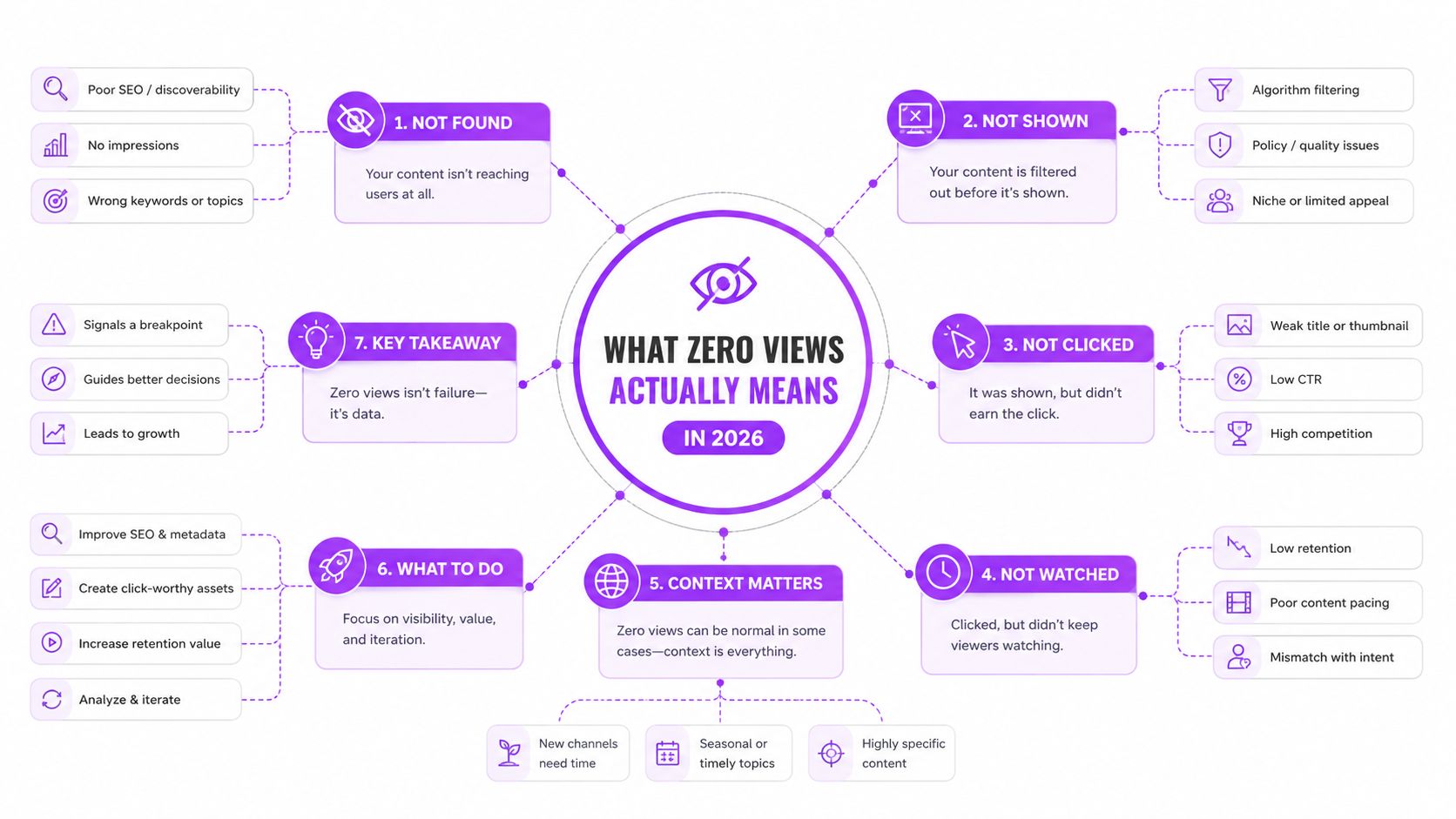
The three buckets
Processing or review delay means TikTok hasn’t finished making the video available. The post may appear on your profile while its distribution remains incomplete. A technical backfill or review delay can resolve within 2 to 24 hours, according to this TikTok no-views troubleshooting guide. During that period, deleting and re-uploading can create a second processing event instead of fixing the first one.
Distribution suppression means the video is technically present but receives little or no For You exposure. A healthy account can receive 60% to 90% of views from the For You Page, while suppressed accounts may fall below 5% or reach zero FYP traffic, based on this 2026 guide to TikTok zero-view patterns. Treat that traffic-source pattern as more meaningful than your emotional reaction to the counter.
Account restriction affects the account rather than one isolated upload. If zero or near-zero views persist across 3 consecutive videos posted 24 or more hours apart, suppression is likely, according to the same guide. Account warnings, repeated eligibility notices, or a sudden collapse across multiple posts move the diagnosis toward this bucket.
Look at the post timestamp, For You exposure, and recent upload history together. One stalled video can be processing. Several stalled videos with no FYP traffic deserve an account-level investigation.
Diagnosing the Real Cause Inside TikTok Studio
TikTok Studio should be your first stop, not a hashtag generator or a panic re-upload. Open the affected video and work from the most basic question outward: did the upload finish, is the post eligible, and has TikTok sent it anywhere?
Start with the post status
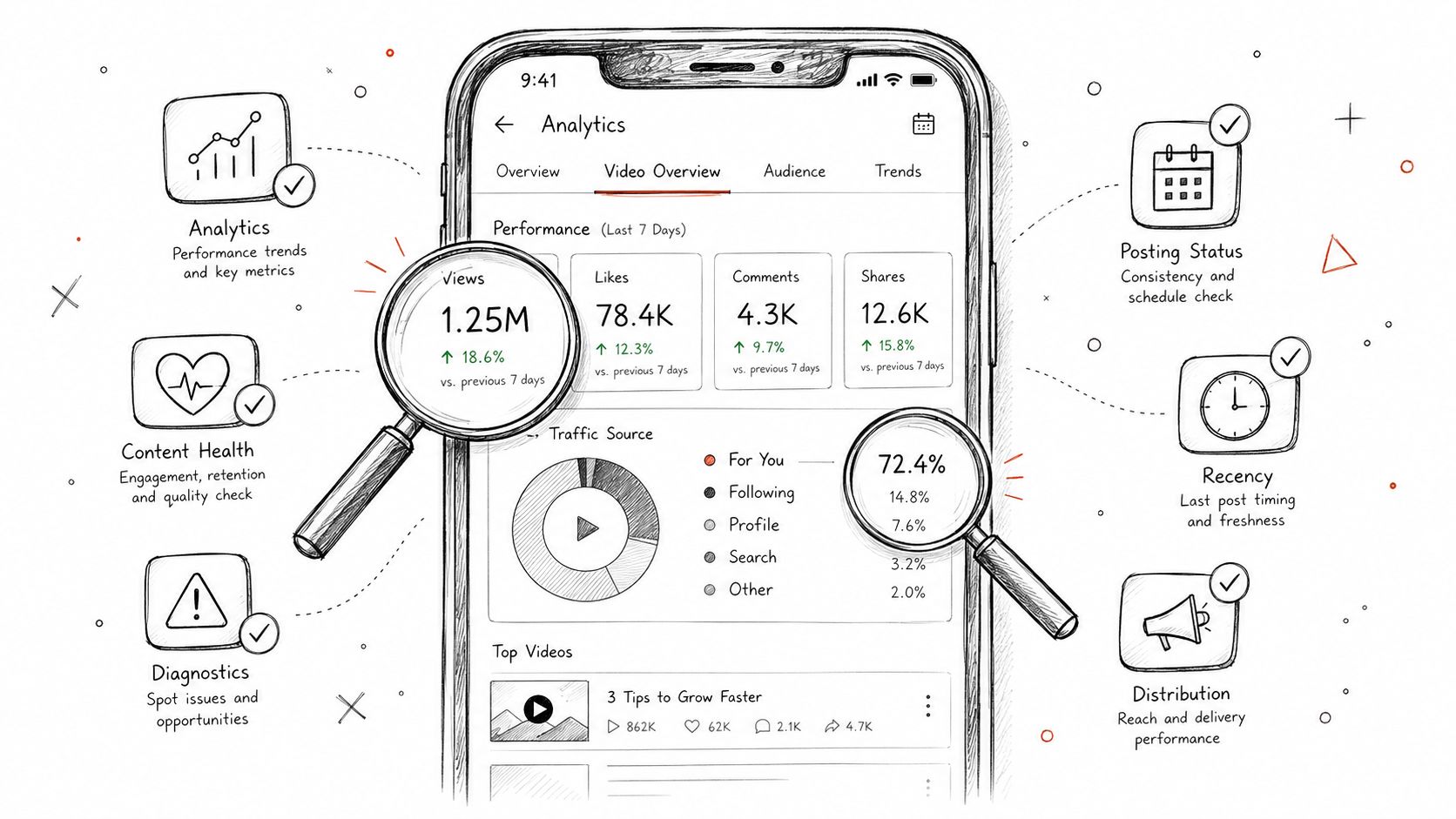
Open the video’s overview and confirm the displayed view count, visibility, and processing state. A pending status is a technical or review clue. A completed status with no meaningful traffic source suggests you should inspect distribution and eligibility instead.
Check the privacy setting directly. A post intended for discovery must be public, and account-level privacy choices can prevent the exposure you’re expecting. Verify the setting from the affected post rather than assuming the default was applied correctly.
Read traffic sources before judging creative
In Video Overview or Analytics, inspect the traffic-source breakdown. Zero For You exposure points toward distribution or eligibility trouble. If the post has started receiving exposure but viewers leave quickly, the content becomes the primary suspect.
Don’t confuse missing data with poor performance. A retention curve can’t tell you much when TikTok hasn’t shown the video to viewers. First confirm that the platform created an audience sample, then evaluate watch behavior.
Check health and violation panels
Open Content Health for post-specific notices, then review Account Health or Account Status for strikes, restrictions, or For You eligibility warnings. A video flag points to the post. An account warning changes how you should interpret every recent upload.
Record what you find before taking action. Save the post time, status, traffic source, and any warning text in a simple log. That record helps you compare the next upload and prevents you from making five changes without knowing which one mattered.
If Studio shows completed processing, public visibility, no warning, and normal exposure, stop treating the issue as a technical failure. Move to the first seconds of the video, where weak retention usually ends distribution.
Fixing the Content So the For You Page Picks It Up
Once the account and upload are clean, the creative gets the blame. I’d start with the opening frame, not the caption. A static talking head, a greeting, or a vague setup asks viewers to invest before they know the payoff.
Replace that with immediate information. Instead of “Hey everyone, today I’m going to talk about TikTok views,” open with “Your TikTok has zero views because the upload may never have entered distribution.” Put the promise on screen, show movement immediately, and cut straight to the first useful detail.
Build the video around retention
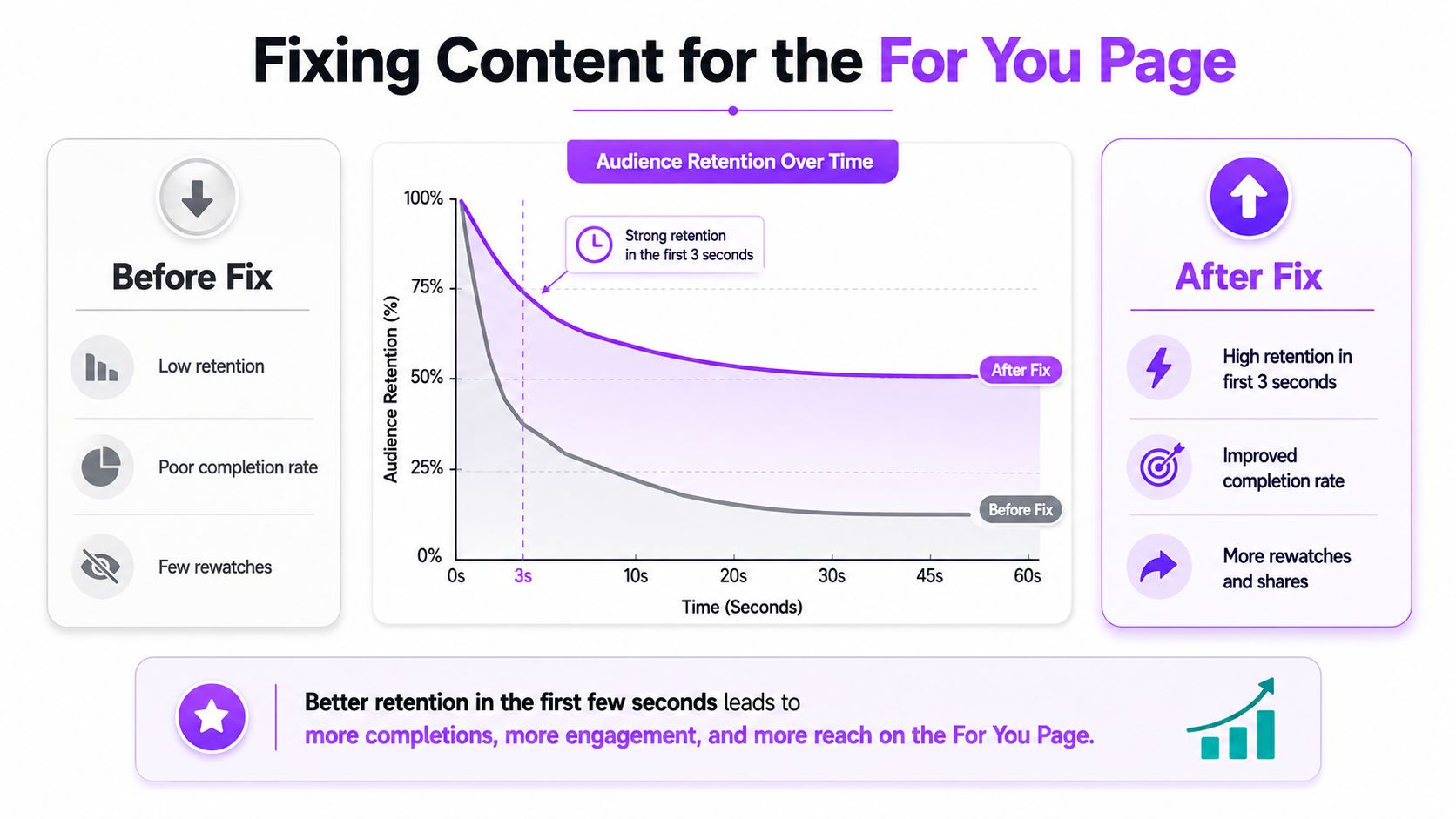
Study where viewers leave, not just the final view count. TikTok’s content-side signals include completion, rewatches, and shares, and weak early retention gives the system little reason to extend distribution. A video that begins with a long setup can lose its audience before the explanation starts.
Use a simple edit pass:
- Remove the runway. Cut greetings, branding animations, and empty pauses from the opening.
- Show the result early. Reveal the before-and-after, the mistake, or the finished action before explaining the process.
- Add readable context. Use concise captions or an on-screen promise so the viewer understands the subject without sound.
- Deliver the payoff. Don’t tease a solution and bury it near the end.
- Create a reason to respond. Ask a specific question tied to the video, not a generic request for engagement.
Make metadata support the idea
Use the primary topic naturally in the caption and spoken audio. If the video solves a TikTok zero-views problem, say that clearly rather than hiding the subject behind broad trend language. Relevant hashtags can clarify the niche, but they can’t compensate for an opening that fails to earn attention.
For creators turning long recordings into short clips, an AI video clipper workflow can help surface moments worth testing, but selection still needs human judgment. The most technically polished clip can fail if its first frame starts before the interesting moment.
I don’t use a fixed retention percentage as a universal rescue line. The useful rule is simpler: if viewers leave before the video establishes its promise, metadata won’t save it. Fix the first meaningful beat, then tighten every cut that delays it.
Reposting and Repurposing Without Triggering Filters
A dead post isn’t automatically a lost idea. A raw repost, however, is a poor experiment because it gives TikTok the same file, the same opening problem, and another chance to classify the upload as recycled.
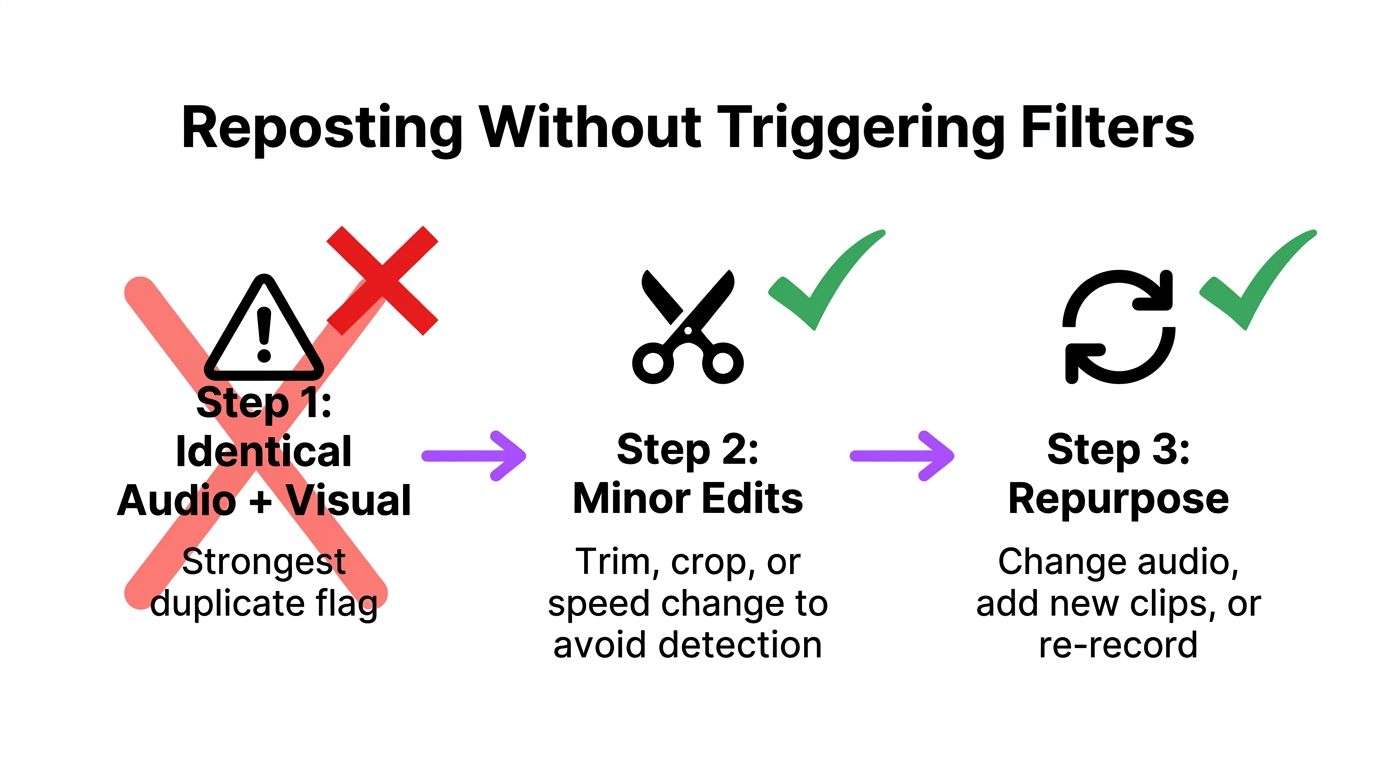
The clearest duplicate signal is identical audio combined with identical visual frames. A single export with tiny cosmetic changes usually isn’t enough to make the version meaningfully different. Don’t rely on a minor speed adjustment or a small crop as your entire transformation.
Use a real transformation pass
Before re-uploading, change the editorial identity of the clip:
- Replace the opening: Start at the strongest action or re-record a direct hook.
- Swap the audio: Use a new voice track, original sound, or a different licensed audio choice.
- Reframe the image: Crop for a different subject emphasis and reposition facecam or gameplay.
- Rewrite on-screen text: Match the new angle instead of carrying over the original title.
- Change the structure: Remove repetition, add context, or move the payoff earlier.
- Build a new ending: Invite a specific response or connect the clip to a follow-up.
Wait before testing the transformed version. The practical guidance in this workflow is to leave 24 to 72 hours between uploads, then log the original and revised versions separately. That waiting period comes from the supplied reposting plan, not a verified platform guarantee, so treat it as an operational safeguard rather than a rule TikTok publicly promises.
Repurpose from the source, not from the failed post
Keep a clean master export for Reels and Shorts, then create a TikTok-specific re-edit. That lets you change the hook, pacing, captions, and framing without repeatedly modifying the already-published file.
For a repeatable process, BlitzReels AI TikTok repurposing provides useful context on adapting short-form material instead of treating every platform upload as an identical copy. You can also use a dedicated video repurposing workflow to track source file, opening frame, audio, caption angle, posting time, and result.
Your log should answer one question: did the transformed concept perform differently, or did the account still fail to distribute it? Without that comparison, reposting becomes superstition.
What Actually Works During a Suppression Window
The worst response to a suspected suppression window is frantic activity. Creators delete the post, upload the same file again, add a pile of trending hashtags, and then open another account when the counter stays flat. Those actions create noise while leaving the original account signals unresolved.
Deleting and immediately reposting the same clip is especially weak. If the first upload is still processing or the account is being filtered, a duplicate upload won’t repair the underlying condition. It may also make the account look more repetitive and automated.
A burner account isn’t a clean escape route either. It fragments your audience, creates another account to manage, and can introduce additional policy risk. Don’t use a new identity to avoid understanding the restriction on the account you care about.
Trending hashtags don’t resurrect a post that receives no recommendation exposure. Hashtags can describe a healthy piece of content, but they can’t force TikTok to distribute a video that remains under review or fails eligibility checks.
Use the recovery window deliberately
Independent guidance describes shadowban-like suppression windows ranging from 24 hours to 2 weeks, with severe cases lasting longer or becoming permanent, as summarized in the supplied TikTok zero-view research. That range is too broad for a countdown strategy. Treat it as a reason to stop making impulsive changes and watch the account pattern.
During recovery, return to normal behavior:
- Reply to genuine comments instead of posting repetitive comments elsewhere.
- Use Duet or similar native participation only when it fits your content.
- Go live when you normally would, with a real topic and audience purpose.
- Avoid mass actions, repeated uploads, and suspicious automation.
- Keep the next uploads distinct, original, and easy to evaluate.
Don’t chase the dead video. Post on schedule, review each result, and let TikTok reassess the account through the next three uploads, while remembering that this is a practical discipline rule, not a guaranteed platform process. If Account Health shows a restriction, appeal or follow the platform’s instructions instead of trying to outpost the warning.
Your Zero-Views Recovery Checklist
Run this checklist in order. The sequence matters because fast technical checks can rule out a broken upload, while Studio evidence can stop you from wasting a day rewriting content that TikTok never distributed.
The first minute
- Refresh the environment: Close and reopen TikTok, confirm the connection is stable, and check the post from another viewing context.
- Confirm visibility: Open the post’s privacy settings and verify that it’s public.
- Check the app state: Update or reinstall TikTok only if the app is behaving abnormally, then verify whether the post status changed.
- Keep the evidence: Note the upload time and current status before deleting anything.
The first 10 minutes inside Studio
- Review Posting Status: A pending or incomplete state points to processing rather than creative failure.
- Open Video Overview: Record views, traffic sources, and any available For You exposure.
- Inspect Content Health: Look for a violation, eligibility notice, or moderation message attached to the post.
- Check Account Health: An account-level warning changes the fix path for every recent upload.
- Audit the posting hour: Compare the upload with your own audience activity patterns, without treating timing as proof of suppression.
The 24-hour content audit
Once distribution is confirmed, watch the opening as a stranger. Mark the first moment where the video explains its payoff, then cut everything that arrives before it unless that material earns attention.
Scan the caption for a clear topic, review the sound for originality and suitability, and inspect the retention curve when enough viewer data exists. If the post had no audience exposure, record that fact and avoid drawing content conclusions from an empty sample.
A seven-day recovery loop
- Day 1: Reassess the post, account health, visibility, and opening.
- Day 2: Create a transformed version with a new opening frame, not a raw duplicate.
- Day 3: Test a format that has already made sense for your audience.
- Day 4: Cross-post a native snippet to another short-form channel.
- Day 5: Review your hashtag and sound inventory for repetition or mismatch.
- Day 6: Test a different posting window and log the result.
- Day 7: Evaluate account health alongside the pattern across recent uploads.
A scheduling system can help you maintain the experiment without panic posting. For example, an auto-posting workflow for social media can keep a planned queue visible, but automation won’t fix a restriction or replace a stronger edit.
This checklist is a loop, not a one-shot cure. Diagnose, document, transform, publish, and compare. Consistent evidence beats refreshing a zero counter every few minutes.
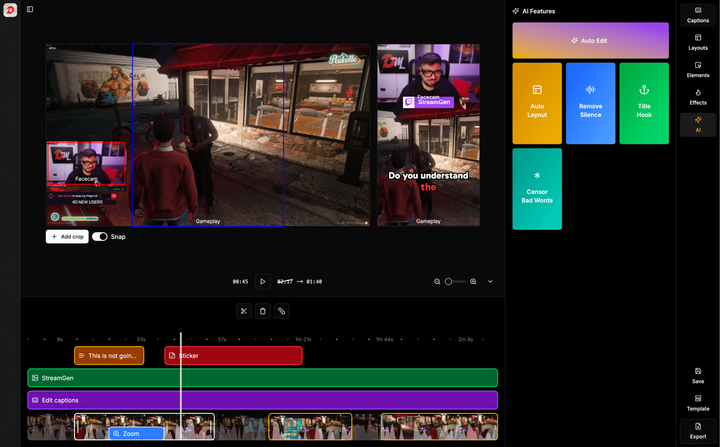
If you’re turning Twitch streams into TikTok clips, StreamGen can find highlight moments, reframe them vertically, add captions, and schedule publishing across short-form platforms. Use it to keep a clean, testable content queue so a zero-view post becomes a diagnostic signal instead of a reason to stop creating.
More blog posts